LLM spend management for recruiting teams
The practice of tracking, controlling, and optimizing what a recruiting team spends on large language model API calls — from per-token pricing to model selection — so AI-assisted hiring scales without surprise bills.
Michal Juhas · Last reviewed May 5, 2026
What is LLM spend management for recruiting teams?
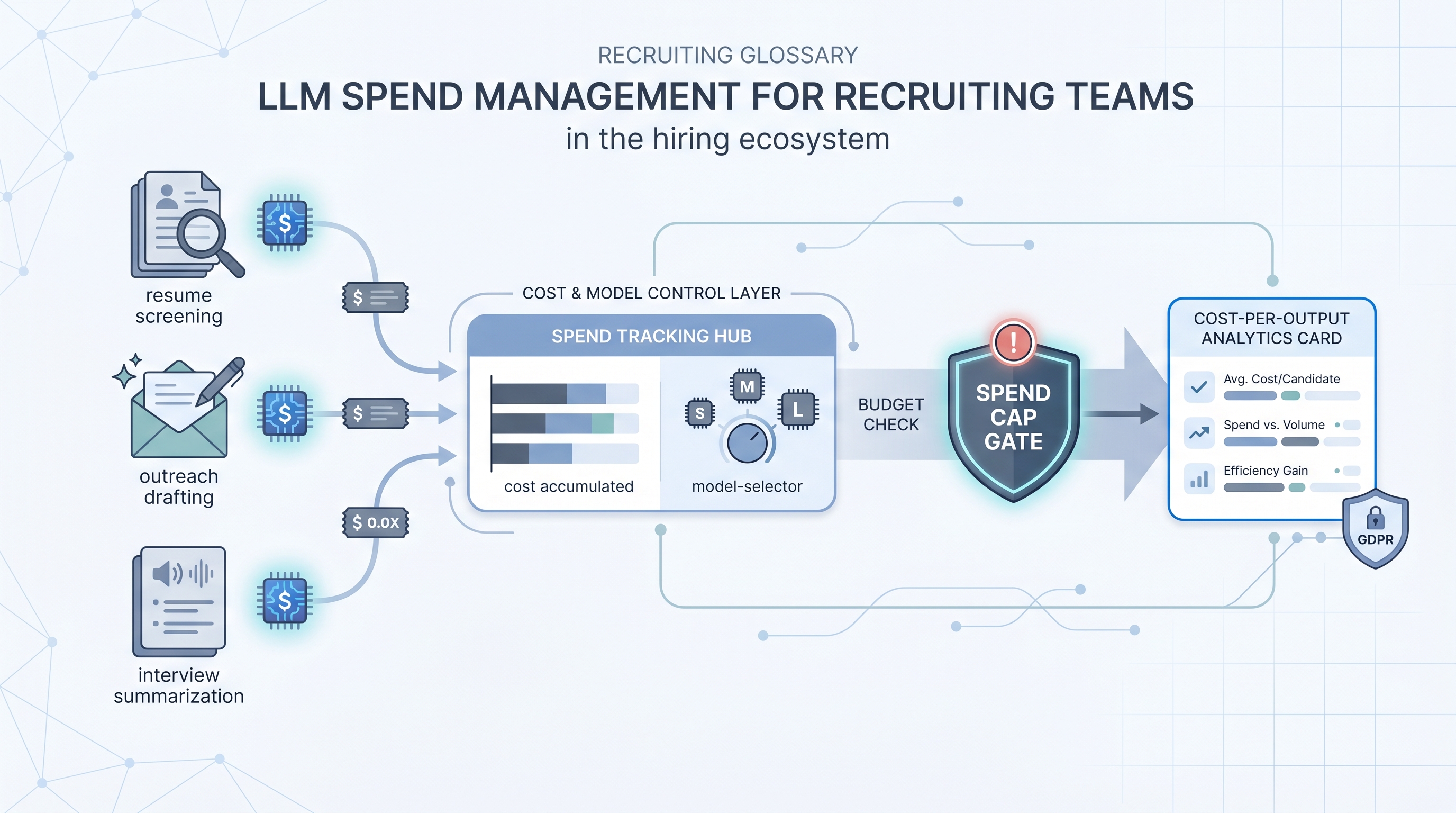
LLM spend management is the practice of tracking, controlling, and optimizing what a team pays for large language model API calls when running AI tasks in hiring workflows. Every resume screen, outreach draft, interview summary, or Boolean query costs tokens, and token costs compound quickly when volume scales or model choices are not deliberate.
Most teams discover this the wrong way: a batch screening job runs without a ceiling, a month-end invoice arrives, and suddenly IT is freezing API keys while finance asks why a line item no one approved is twice the cost of the ATS subscription.
In practice
- A sourcing ops manager reviewing a month-end invoice for $2,400 in API charges discovers most came from one uncapped batch job that screened every application through a frontier model. That is unmanaged LLM spend.
- When a recruiter sends full PDF text plus a cover letter to a model when only title, years, and three must-haves are needed, the per-screen token cost can be ten times higher than a trimmed prompt would produce.
- TA leaders who present "cost per AI-assisted screen" alongside recruiter hours freed are doing LLM spend management and tend to have an easier conversation with finance than those who arrive with a raw API bill and no context.
Quick read, then how hiring teams use it
This is for recruiters, TA leaders, and sourcing ops who are starting to run AI tasks at volume and need to manage what those tasks cost without slowing down the work. Skim the first section for a shared vocabulary. Use the second when you are deciding which models to run, what to log, and how to set guardrails before spend compounds.
Plain-language summary
- What it means for you: Every AI task in recruiting (screening, drafting, summarizing) calls an API that charges per token. Spend management means knowing what you pay per task, not discovering it from an invoice.
- How you would use it: Pick one automated workflow, add logging for model name and token counts, and calculate cost per output. Then decide whether the model is correctly sized for the task or whether a smaller one does the job.
- How to get started: Ask which automated AI step runs most often. Log that one first. A spreadsheet column with task type, model, and token count gives you enough data to make a model selection decision.
- When it is a good time: Before you add a second or third automated step to a workflow. Catching spend patterns early costs less than re-architecting after a billing surprise.
When you are running live reqs and tools
- What it means for you: At scale, the cost of running AI across a hiring pipeline is a real ops line item. Model choice, context window size, batching strategy, and caching all affect what a quarter of AI-assisted recruiting costs.
- When it is a good time: The moment a workflow moves from one recruiter experimenting to the team running it on every application. That transition is when uncapped spend becomes a real budget risk.
- How to use it: Assign a token budget per task type. Use system instructions to keep prompts lean. Cache stable inputs (role descriptions, rubrics, company context) as a prefix rather than re-sending on every call. Match model tier to task complexity: pass-fail screening rarely needs a frontier model.
- How to get started: Add a spend dashboard before you add automation step number two. Set a monthly ceiling with an alert at 80% so finance hears from you before they see the invoice. Read the workflow automation page for context on where spend logging fits in a production pipeline.
- What to watch for: Verbose prompts sending full documents when structured fields would do, no ceiling on batch jobs, model upgrades that apply to all tasks without a cost review, and GDPR-compliant zero-retention tiers priced at a premium that did not make it into the original budget.
Where we talk about this
On AI with Michal live sessions we look at cost-aware pipeline design in the sourcing automation track: which tasks justify a frontier model, which run fine on a smaller one, and how to build a spend log alongside the workflow rather than after the bill arrives. The AI in recruiting track connects the same decisions to hiring manager trust and GDPR obligations. Both conversations work better when you bring your real task list and a rough volume estimate. Start at Workshops.
Around the web (opinions and rabbit holes)
Third-party creators move fast. Treat these as starting points, not endorsements, and double-check anything before you wire candidate data through a new provider.
YouTube
- Searching "LLM API cost optimization" returns engineering walkthroughs from builders who have hit billing surprises in production. Channels focused on practical AI deployment (rather than hype) tend to cover batching, caching, and model tier selection in hands-on format rather than slides.
- Discussions on which models are worth the premium for production workloads appear frequently on channels covering AI engineering in 2025 and 2026. Look for content that compares cost-per-output rather than benchmark scores alone.
- r/LocalLLaMA is where engineers discuss self-hosted alternatives partly to avoid per-token API billing. The threads on cost versus quality tradeoffs are useful reading before you commit to a cloud provider for any high-volume recruiting task.
- r/MachineLearning has threads on production inference cost patterns that apply to recruiting use cases even when the framing is not TA-specific.
Quora
- Searching "reduce OpenAI API cost production" on Quora surfaces practitioner answers on prompt trimming, model switching, and caching patterns that map directly to recruiting workflow design.
LLM cost levers by recruiting task
| Task | Main cost driver | First lever to pull |
|---|---|---|
| Resume screening | Input token count | Send structured fields, not full PDF |
| Outreach drafting | Model tier | Smaller model plus human review gate |
| Interview summarization | Transcript length | Chunk and summarize in stages |
| Boolean query building | Low volume | Minimal optimization needed |
Related on this site
- Glossary: LLM tokens, Workflow automation, System instructions, Human-in-the-loop (HITL), GDPR and first-touch outreach
- Tools: Sourcer productivity tools, AI sourcing tools
- Blog: AI sourcing tools for recruiters
- Live cohort: Workshops
- Membership: Become a member
- Course: Starting with AI: the foundations in recruiting