Notion AI for recruiting ops
An AI writing and summarisation layer built into Notion that lets recruiting and TA teams draft job descriptions, generate scorecard templates, summarise interview notes, and maintain hiring wikis inside the same workspace where their ops docs already live.
Michal Juhas · Last reviewed May 5, 2026
What is Notion AI for recruiting ops?
Notion AI is the AI writing and summarisation layer built into Notion workspace. For recruiting and TA teams, it means the same tool that holds job description templates, hiring runbooks, scorecard rubrics, and candidate trackers can now generate first drafts, summarise interview notes, and answer questions about your own process documents.
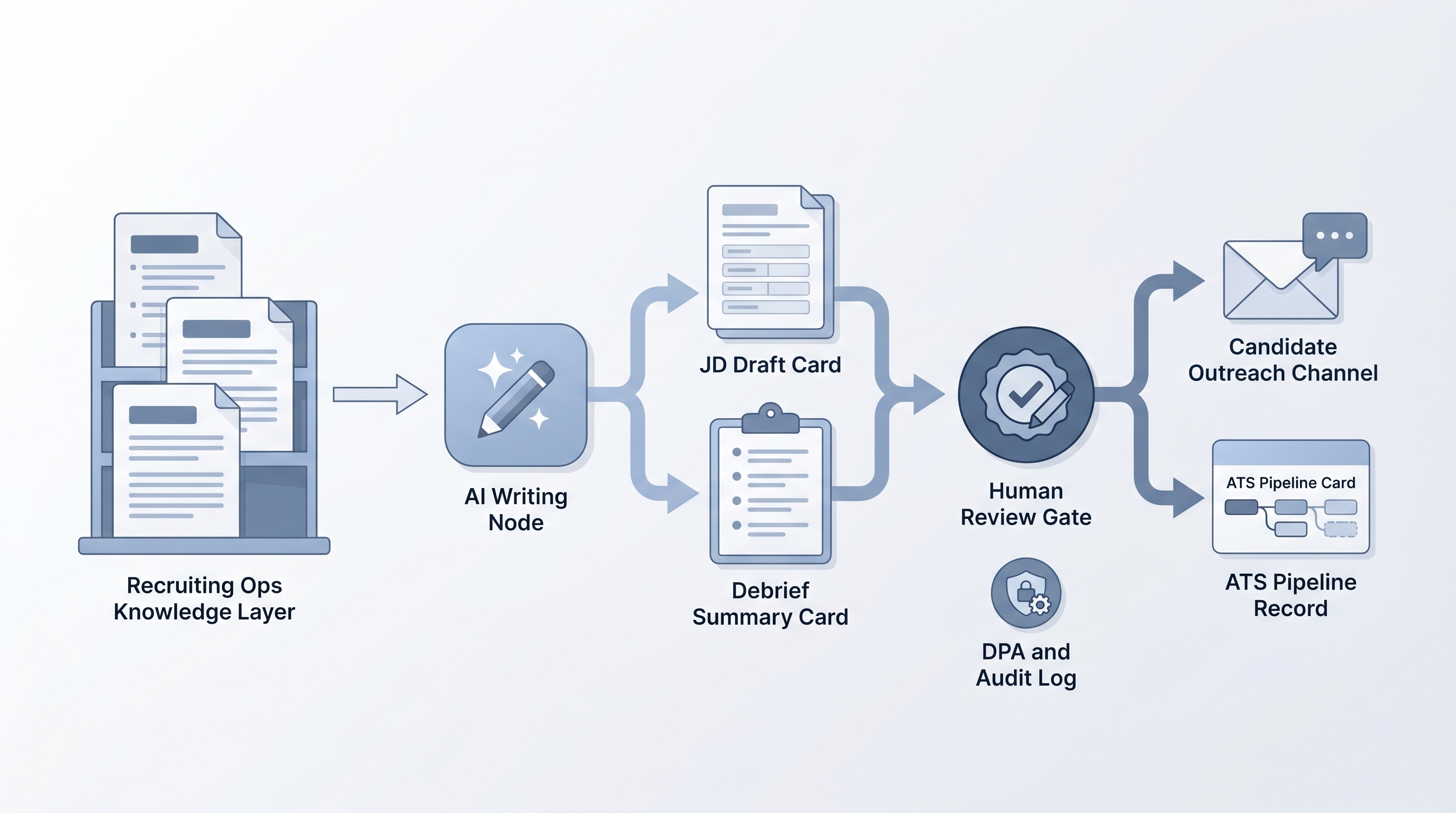
The practical shift is consolidation: instead of exporting notes to a separate AI tool and copying output back, the drafting step happens inside the same workspace where your recruiting ops already live. The hard limit is context: Notion AI reasons from what is currently on the page, so output quality depends directly on how well your docs are structured before you prompt.
In practice
- A TA manager pastes five bullet points from an intake call into a Notion template and runs Notion AI to generate a draft JD, then edits for equitable language and role accuracy before sharing with the hiring manager.
- A recruiter uses Notion AI to summarise raw interview debrief notes into a structured scorecard format after each panel, then routes the summary through a human review step before it enters the ATS.
- A recruiting ops lead builds a hiring wiki in Notion, then uses Notion AI to answer process questions from new team members, reducing the time spent repointing people to runbooks.
Quick read, then how hiring teams use it
This is for recruiters, TA, and HR ops practitioners who need shared vocabulary when evaluating tools, running debriefs, or reviewing vendor claims. Skim the first section for a fast shared picture. Use the second when you are deciding how Notion AI fits into your current stack and what guard rails to put around it.
Plain-language summary
- What it means for you: Your Notion workspace can now draft and summarise, so JD writing, debrief notes, and process docs have an AI assist layer without switching tools.
- How you would use it: Open a Notion page, add your intake notes or rough bullets, run AI on the block, and review the output before it leaves your workspace.
- How to get started: Test on one task you do every week. Compare the AI output against your own draft. Identify what the model misses without proper context.
- When it is a good time: When your team already uses Notion as the main ops layer and wants to reduce manual writing time on templated tasks like JD drafts or debrief summaries.
When you are running live reqs and tools
- What it means for you: Notion AI extends your existing docs layer with drafting and summarisation, but it does not replace a pipeline tool for candidate records, GDPR-compliant tracking, or scheduling integrations.
- When it is a good time: After your Notion workspace has consistent, well-structured process docs that can serve as AI context, and after your team has agreed on a human review step before any Notion AI output reaches candidates or enters a formal record.
- How to use it: Feed Notion AI a structured template rather than a freeform prompt. Log which AI-generated drafts were used and which were overridden. Do not paste named candidate data into Notion pages without confirming your DPA covers AI processing of that content.
- How to get started: Pick one high-frequency writing task (JD first drafts are the most common entry point), build a repeatable template, and run a four-week test before extending to other tasks.
- What to watch for: Hallucination on specifics (wrong responsibilities, wrong team structure) when intake notes are vague. Data compliance gaps if named candidate data lives in Notion without DPA coverage. Drift between the AI output and the actual role if the hiring manager's input was thin. Over-reliance on AI summaries in debrief records without reviewer edits.
Where we talk about this
On AI with Michal live sessions, Notion AI comes up most in the AI in recruiting track when teams work through ops-layer setup: where intake notes live, how JD drafts get generated, and where the handoff to an ATS happens. If your team is evaluating Notion as the knowledge layer alongside a pipeline tool, the cohort setting lets you compare how other recruiting ops practitioners structure their workspaces. Start at Workshops.
Around the web (opinions and rabbit holes)
Third-party creators move fast. Treat these as starting points, not endorsements, and double-check anything before you wire candidate data to any tool.
YouTube
- Search "Notion AI for recruiting" on YouTube for walkthroughs of JD drafting, interview debrief templates, and hiring wiki setups. Practitioner-run sessions with real workspace examples are more useful than vendor overview demos.
- Search "Notion recruiting template" to find community-built setups that show how teams structure their process docs before adding an AI layer.
- r/Notion threads on recruiting and HR use cases surface real friction points around AI accuracy, database design, and what Notion does not do well compared to dedicated HR tools.
- r/recruiting discussions on tools and ops often include Notion comparisons against Greenhouse, Lever, and other ATS platforms for small teams.
Quora
- How do recruiters use Notion? collects practitioner answers on templates, candidate tracking, and process documentation (quality varies; read critically and verify claims).
Notion AI versus a dedicated ATS AI layer
| Capability | Notion AI | ATS AI layer |
|---|---|---|
| JD and template drafting | Strong | Limited or none |
| Interview debrief summaries | Strong | Varies by ATS vendor |
| Candidate pipeline tracking | Not built for it | Core function |
| GDPR-compliant candidate records | Requires DPA setup | Built-in compliance framework |
| Sourcing and scheduling integrations | Via external automation | Native in most ATSs |
| Audit trail for hiring decisions | Manual logging | Automated record keeping |
| Knowledge base and runbooks | Strong | Limited |
Related on this site
- Glossary: Human-in-the-loop (HITL), Scorecard, Workflow automation, Intake-to-JD AI
- Glossary: ATS tools for recruitment, Agent knowledge base, Hallucination
- Live cohort: Workshops
- Courses: Starting with AI: foundations
- Membership: Become a member