One-way video interview
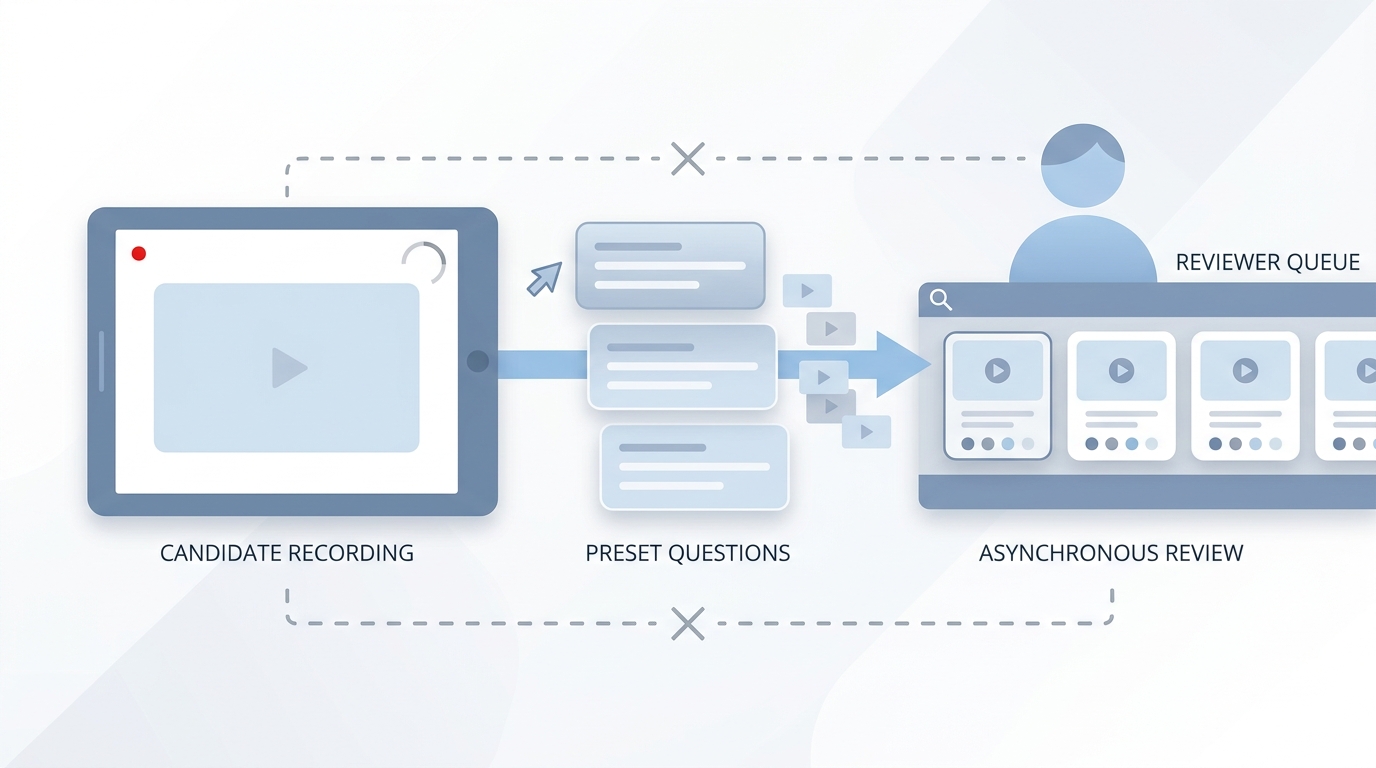
A structured screening format where candidates record answers to preset questions on their own schedule, without a live interviewer present, before the hiring team reviews the clips.
Michal Juhas · Last reviewed May 3, 2026
What is a one-way video interview?
A one-way video interview lets candidates record answers to preset questions on their own schedule, without a live interviewer on the other end. Reviewers watch the clips later, often in batches. The format sits between a written application and a phone screen, and most teams use vendors such as HireVue, Spark Hire, or myInterview to run it.
In practice
- A recruiter at a scale-up sends 40 candidates a Spark Hire link instead of booking 40 calls. The same four questions, a 90-second limit each, and the team watches together on Thursday afternoon before deciding who moves forward.
- Candidates in sourcing forums call it "the video thing" or "the pre-screen video." They record it on a phone between other tasks, often in an evening or on a commute.
- TA leaders pitch the format to hiring managers as a way to see candidates before committing to a live calendar block, which sidesteps the fight over scarce morning slots.
Quick read, then how hiring teams use it
This is for recruiters, sourcers, TA, and HR partners who need the same vocabulary in debriefs, vendor calls, and policy reviews. Skim the first section for a fast shared picture. Use the second when you are deciding how it fits into your ATS and screening process.
Plain-language summary
- What it means for you: Instead of booking 30 phone screens, you send a link. Candidates record two to four questions on their own time. You and the hiring manager watch later.
- How you would use it: For early funnel roles where the same questions appear on every call and volume is too high to schedule one by one.
- How to get started: Write the three questions you ask on every first screen. Add a rubric for each. Pilot on one role where you receive more than 15 applications per week and the job description is stable.
- When it is a good time: When scheduling is the real bottleneck and you can staff a human review gate within five business days of submission.
When you are running live reqs and tools
- What it means for you: One-way video is a scheduling trade, not a quality upgrade. You gain throughput; you lose the follow-up question. Pair it with a rubric and a reply SLA or you get faster screening with the same bias patterns.
- When it is a good time: When hiring managers ask for pre-screen signal and decline to calendar screen calls, or when intake spikes from programmatic advertising or automated outreach.
- How to use it: Wire the vendor into your ATS so reviewed clips move stages automatically. Keep AI-generated scores off the official record until you have audited them for adverse impact.
- How to get started: Resolve consent and data retention questions before you invite candidates. Test captions and check the recording flow on mobile at low bandwidth.
- What to watch for: Completion drop-off after the invite, ghosting post-submission, and automated scoring overlays that legal has not reviewed.
Where we talk about this
Live AI in recruiting sessions at AI with Michal use one-way video as a working case study: where does human review need to stay, what does the rubric need to say, and how do you brief candidates so they trust the process. If your organization is deciding whether to add, replace, or remove this step, bring the real policy constraints to Workshops and work through them with practitioners who have run both sides.
Around the web (opinions and rabbit holes)
Third-party creators move fast. Treat these as starting points, not endorsements, and double-check anything before you wire candidate data.
YouTube
- One-Way Video Interviewing Explained | Asynchronous & On-Demand (Spark Hire) walks the candidate-facing format that most teams call one-way video.
- Job Seekers React to One Way Video Interviews shows real candidate reactions worth watching before you write your invite email.
- The future of hiring and AI covers vendor claims around bias and AI scoring, useful context for evaluating automated overlays.
- How are video interviews (asynchronous) actually working out for you? in r/recruiting is a practitioner thread on real trade-offs.
- Are one way video interviews actually here to stay? in r/Recruitment debates agency realities.
- Recruiters, is asynchronous video interviewing of candidates useful or a waste of time? in r/recruiting is a longstanding split on value.
Quora
- What are the pros and cons of one-way video interviews? collects mixed candidate and employer answers (read critically).
One-way video versus live phone screen
| Factor | One-way video | Live phone screen |
|---|---|---|
| Scheduling | Candidate picks own time | Both parties must align |
| Follow-up questions | Not available | Available in real time |
| Accessibility | Requires captions and low-bandwidth option | Easier to accommodate |
| Bias risk | Appearance and vocal cues visible on review | Name and voice cues live |
| Volume | Scales to hundreds | Bottlenecks at recruiter hours |
Related on this site
- Glossary: Async screening, Scorecard, Human-in-the-loop (HITL), Adverse impact (selection), Structured output, Workflow automation
- Blog: AI candidate screening
- Guides: Talent acquisition managers
- Course: Starting with AI: the foundations in recruiting
- Live cohort: Workshops
- Membership: Become a member