Recruiting email automation
Using AI tools and automated workflows to draft, schedule, and send emails to candidates at each stage of the hiring funnel, reducing manual copy-paste and keeping communication consistent.
Michal Juhas · Last reviewed May 4, 2026
What is recruiting email automation?
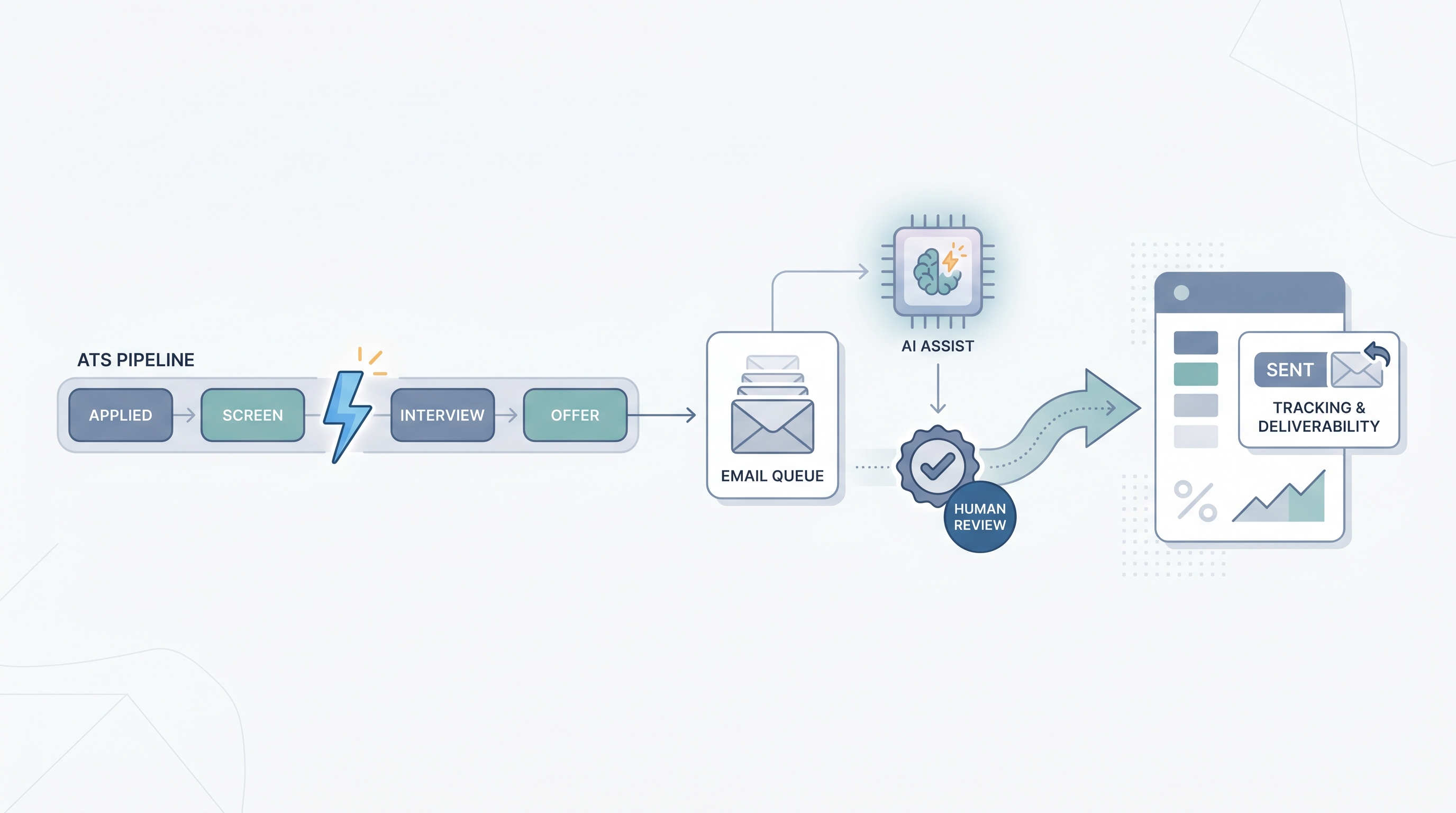
Recruiting email automation connects your ATS to an email platform so candidate messages fire on stage changes without a recruiter sending each one by hand. The spectrum runs from a simple webhook (new application triggers an acknowledgment) all the way to AI-drafted personalized outreach reviewed before each send.
In practice
- A recruiter sets up a Make scenario: when a candidate moves to the "Offer Extended" stage in their ATS, an email goes out automatically with the offer letter attached and a signing deadline. No manual copy-paste.
- A sourcing team uses an AI drafting step paired with a review queue: Claude generates a first-touch message personalized to a candidate's recent project, a human edits and approves, then the message sends. That is still email automation, just with a generation node inside it.
- A TA ops lead might say "our confirmation emails are broken" when they mean the webhook that fires on calendar-invite creation stopped triggering after an ATS update, not that anyone typed the wrong thing.
Quick read, then how hiring teams use it
This is for recruiters, sourcers, TA leads, and HR operations who need shared language in vendor calls, debrief sessions, and policy reviews. Skim the first section for a fast shared picture. Use the second when you are deciding which candidate emails to automate and how to add a safe review step.
Plain-language summary
- What it means for you: Instead of writing and sending a confirmation, a status update, or a rejection email for each candidate one by one, you set up rules that send the right message when a stage changes in your ATS.
- How you would use it: Pick one email type you send twenty or more times a week, write a stable template, wire a trigger in Zapier, Make, or your ATS native automation, and confirm it fires correctly before adding the next one.
- How to get started: Audit every automated email your ATS already sends. Find the gaps (the ones you still type manually). Pick the highest-volume gap, write one template, and test it on a small batch before going live.
- When it is a good time: After the process is stable and the template copy has been reviewed by someone who will own updating it when company information changes.
When you are running live reqs and tools
- What it means for you: Automation moves state between systems (ATS stage, email platform, CRM) and fires messages at scale. A mapping error or a stale template reaches every candidate in the queue, not just one.
- When it is a good time: After workflow automation fundamentals are in place: stable webhooks, error alerting, and a named owner for credentials and template updates.
- How to use it: Map ATS fields to email template variables explicitly. Add a dead-letter inbox for failed sends. Use a human-in-the-loop queue for any AI-drafted message before it reaches candidates. Log trigger events so you can replay or audit if something goes wrong.
- How to get started: Wire one internal notification first (Slack ping on new req) to confirm credentials and webhook setup work. Then move to transactional candidate emails (confirmation, reminder), then stage-based status updates, and only then AI-assisted outreach drafts.
- What to watch for: Duplicate sends on trigger retries, personalization variables left unfilled, reply-to addresses nobody monitors, and templates nobody updates when benefits or salary bands change. Deliverability issues (SPF, DKIM, DMARC misconfiguration) can silently route everything to spam within weeks.
Where we talk about this
On AI with Michal live sessions, the sourcing automation track covers trigger-based email flows and AI drafting queues end to end, including real ATS webhook setups and how to handle the first production failure. The AI in recruiting track frames the same patterns from the hiring manager trust and GDPR perspective. If you want the full room conversation with your actual stack, start at Workshops.
Around the web (opinions and rabbit holes)
Third-party creators move fast. Treat these as starting points, not endorsements, and double-check anything before you wire candidate data.
YouTube
- Search "recruiting email automation n8n" or "candidate email automation Zapier" to find recent no-code workflow walkthroughs from 2024-2025 that show end-to-end builds with real ATS triggers.
- Search "AI recruiting outreach automation" for demos of AI drafting nodes paired with human review queues before candidate sends.
- r/recruiting search: automate candidate emails - practitioner threads on what actually works in ATS-connected automations and common failure stories.
- r/RecruitmentAgencies search: email automation - agency-specific discussions on volume outreach and deliverability at scale.
Quora
- Searching "how do recruiters automate candidate outreach emails" returns a range of practitioner answers; read critically and check dates on any tool recommendations since this space changes quickly.
Automated email types compared
| Email type | Automation fit | Risk level |
|---|---|---|
| Application acknowledgment | Excellent: fixed content, high volume | Low |
| Interview confirmation | Excellent: date and link from calendar | Low |
| Stage update (still reviewing) | Good: template with stage variable | Low-medium |
| Personalized outreach | Needs AI draft plus human review | High without gate |
| Rejection | Good if template is tested | Medium: tone errors at scale |
Related on this site
- Glossary: Workflow automation, Human-in-the-loop (HITL), Candidate data enrichment, AI-native, Prompt chain
- Blog: AI sourcing tools for recruiters
- Tools: n8n, Claude
- Live cohort: Workshops
- Membership: Become a member