Environment files and secrets in recruiting AI projects
The practices that protect API keys, model credentials, and integration tokens in recruiting AI projects by keeping them out of code, version control, and shared documents while ensuring only authorized systems and people can use them.
Michal Juhas · Last reviewed May 5, 2026
What is an environment file and why does it matter in recruiting AI?
Environment files and secrets management refers to how teams building AI-powered hiring tools store, share, and protect sensitive credentials: the API keys, bearer tokens, and model provider keys that make the tools run. When a recruiter or TA ops person first builds a workflow that calls an LLM, pulls from a sourcing database, or writes back to an ATS, those credentials need to live somewhere accessible to the script but hidden from anyone who should not have them.
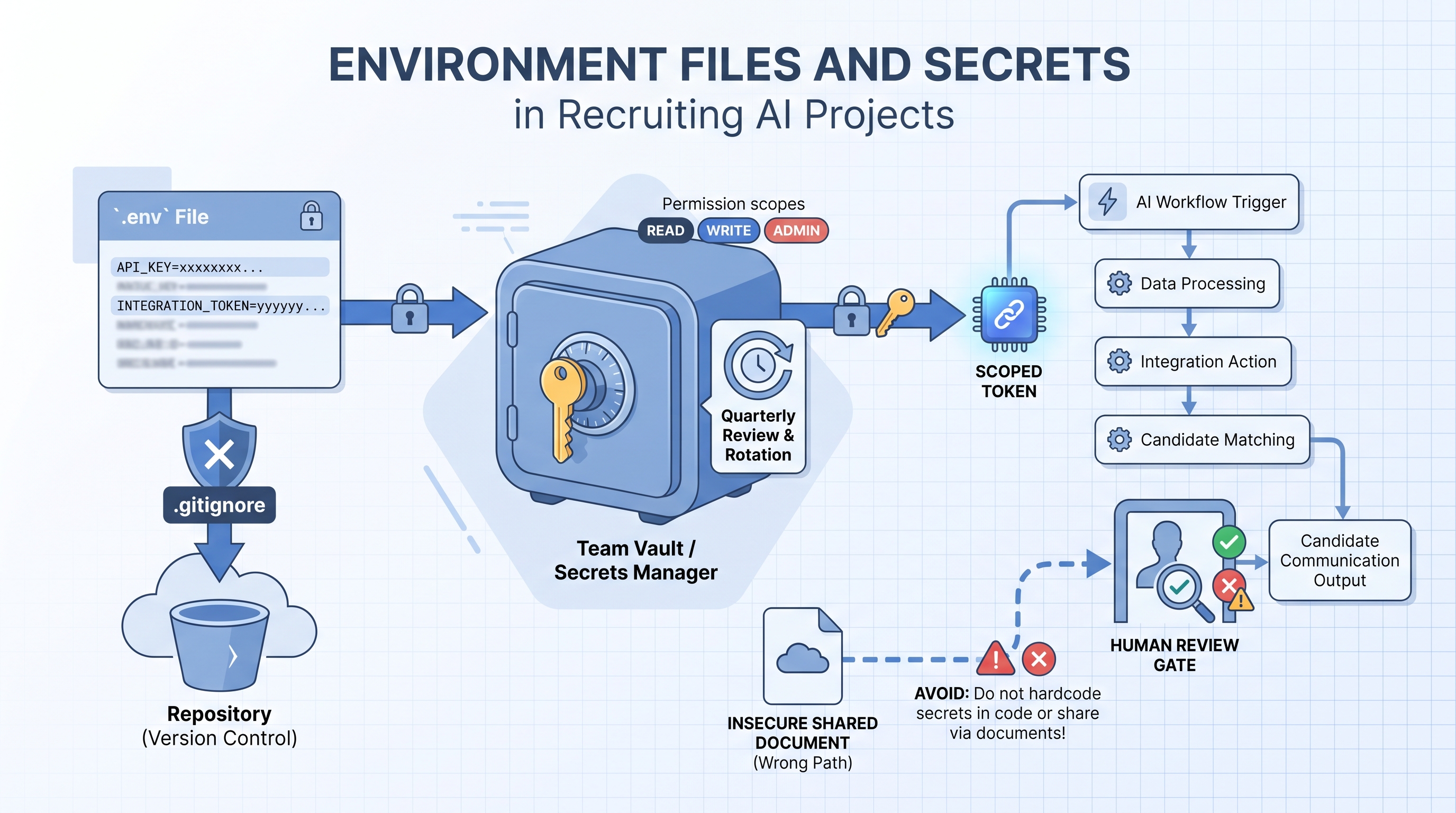
The most common pattern is a .env file: a plain-text configuration file sitting at the root of a project folder, storing credentials as name-value pairs like OPENAI_API_KEY=sk-.... Code reads those values at runtime without the actual secret appearing in the source itself. The file is listed in .gitignore so it is never committed to version control. A companion .env.example file with blank or fake values is the shareable version for onboarding teammates.
Getting this right matters beyond IT policy. In recruiting AI projects, these secrets carry access to candidate data, model usage budgets, ATS write permissions, and enrichment vendor accounts. A leaked secret can expose candidate PII, trigger unauthorized outreach, or generate unexpected invoices before anyone notices a problem.
In practice
- When a TA ops manager says "someone committed the API key," they mean a real
.envfile was pushed to a shared GitHub repository instead of the placeholder.env.example, exposing credentials to anyone with repository access. - A recruiter building their first AI sourcing script often pastes a key directly into the code "just to test it," then shares the script with a colleague without removing the credential, which is the most common entry point for accidental leaks in cohort sessions.
- A quarterly secret rotation routine, revoking keys for vendors no longer in use and rotating keys older than 90 days, is the single highest-leverage security maintenance task for a small TA team without dedicated IT support.
Quick read, then how hiring teams use it
This is for recruiters, TA ops professionals, and HR leaders who are building or evaluating AI recruiting workflows and need a working understanding of credential hygiene. Skim the first section for the vocabulary. Use the second when you are setting up live integrations.
Plain-language summary
- What it means for you: API keys and tokens are the passwords your AI tools use to talk to each other. If they land in the wrong place, someone outside your team can use them, and you are responsible for what happens next.
- How you would use it: Create a
.envfile for credentials, list it in.gitignore, commit only the.env.exampleplaceholder to version control, and store real values in a team password manager. - How to get started: Open your current AI project folder and check whether any file containing
API_KEYorTOKENhas been committed to version control. If so, revoke and rotate the affected key immediately. - When it is a good time: Before any new integration goes live, before sharing a script folder with a colleague, and quarterly as a maintenance check.
When you are running live reqs and tools
- What it means for you: In recruiting AI workflows, secrets often carry ATS write access and candidate data read access at the same time. A single exposed key can write to live requisitions or read candidate PII without firing any alert.
- When it is a good time: Review secrets whenever a vendor relationship ends, when a team member with admin access leaves the organization, and every quarter as standard hygiene.
- How to use it: Store credentials in a team vault, not in shared documents or chat. Set expiry reminders when a key is created. Log API calls at the ATS or vendor level and review anomalies monthly. Map each key to its permission scope so you know what is exposed if it leaks.
- How to get started: List every active API key your team uses, the vendor, the permissions it carries, and when it was last rotated. Flag anything marked "full access" or anything that has never been rotated as the first items to fix.
- What to watch for: Keys pasted into shared Notion pages, Postman collections checked into repositories, tokens with broader permissions than the integration actually needs, and credentials for vendor evaluations that were never revoked after the evaluation ended.
Where we talk about this
On AI with Michal live sessions, secret management comes up in the sourcing automation track during the first tool connection: we set up .env files before writing a single line of automation logic, walk through what a leaked key exposes in each vendor, and establish a rotation reminder as part of the project setup. The AI in recruiting track covers the policy side: how to explain credential hygiene to a DPO, what to include in a vendor data flow map, and how to write a one-page credential policy a small TA team can actually follow. Bring your current tool list and any existing credential setup questions to Workshops.
Around the web (opinions and rabbit holes)
Third-party content on secret management ranges from developer-focused to practitioner-friendly. These are starting points; verify any advice against your specific tool documentation and legal team before applying it to candidate data.
YouTube
- How to use .env files in Python covers the
.envpattern in plain language for non-developers building scripted workflows. - API key security best practices includes rotation, scoping, and storage walkthroughs directly applicable to SaaS stack management.
- GDPR and data breach notification explains the notification window and controller responsibilities that apply when a recruiting credential is exposed.
- API key management for small teams in r/sysadmin gives IT-side perspective on the same problems TA ops teams face without dedicated infrastructure support.
- Committed .env files to GitHub in r/learnprogramming is full of real incident stories and recovery steps from people who made the same mistake.
- Recruiting software API integrations in r/recruiting surfaces practical questions from TA ops teams managing vendor connections without an IT function.
Quora
- How do I keep API keys secure in a small team? gathers practitioner and developer advice on the same tradeoffs a small TA team faces when setting up AI workflows.
Secret storage: what to use when
| Storage method | Best for | Key risk |
|---|---|---|
.env file + .gitignore | Local development and scripts | Accidentally committed or shared directly |
| Team password manager | Sharing across a small TA team | Access not reviewed when team members leave |
| CI/CD secrets store | Automated workflows and pipelines | Over-permissioned scopes granted at setup |
| Shared document | Never | Any leak is immediate and undetectable |
Related on this site
- Glossary: OAuth and API security in recruiting stacks, Recruiting webhooks, Workflow automation, ATS API integration, No-code recruiting automation
- Blog: AI sourcing tools for recruiters
- Workshops: AI in recruiting and sourcing automation
- Courses: Starting with AI: the foundations in recruiting
- Membership: Become a member
Frequently asked questions
What is an environment file (.env) in a recruiting AI project?
.env that stores sensitive credentials as name-value pairs. When a recruiter or TA ops person builds an AI workflow that calls a language model, reads from an ATS, or pushes data to an enrichment vendor, those API keys need to live somewhere the code can read them without being written into the source itself. The .env file fills that role. It should always appear in .gitignore so it is never committed to version control, and it should never be shared in a Slack message or Google Doc. A companion .env.example file with placeholder values is the safe substitute for sharing with teammates or onboarding new hires. See also workflow automation for where these credentials appear in practice.What counts as a secret in a recruiting AI workflow?
Why do AI recruiting projects leak secrets more often than other tech projects?
.env file to a shared GitHub repository, pasting a key into a Notion doc to "just get it working," and leaving tokens active after an evaluation period ends. The fix is not more warnings but a setup routine that makes the secure path the easy path from the first session, before any candidate data flows through the workflow.How should a small TA team store and share API keys without dedicated IT support?
.env.example file with placeholder values to version control and treat the real .env as a file that never leaves a local machine or CI environment. Third, run a quarterly review of active keys: confirm which integrations are still in use, rotate any key older than 90 days, and revoke anything tied to a vendor you no longer use. These three habits close the most common exposure paths without a dedicated security function.What happens when an AI recruiting tool API key leaks?
How does secret management connect to GDPR compliance in recruiting?
Where can I learn how to build secure AI recruiting workflows with proper secret management?
.env files, run the first API call, and walk through what a leaked key would expose before anyone wires real candidate data. The Starting with AI: the foundations in recruiting course addresses the same habits at a pace that works for recruiters new to scripted workflows. Membership office hours are useful for specific questions like "is this key storage pattern safe for our stack" from practitioners already running automations. Bring a list of the tools you are integrating and the credentials each one requires; concrete questions get concrete answers.