Meta prompting for recruiting assistants
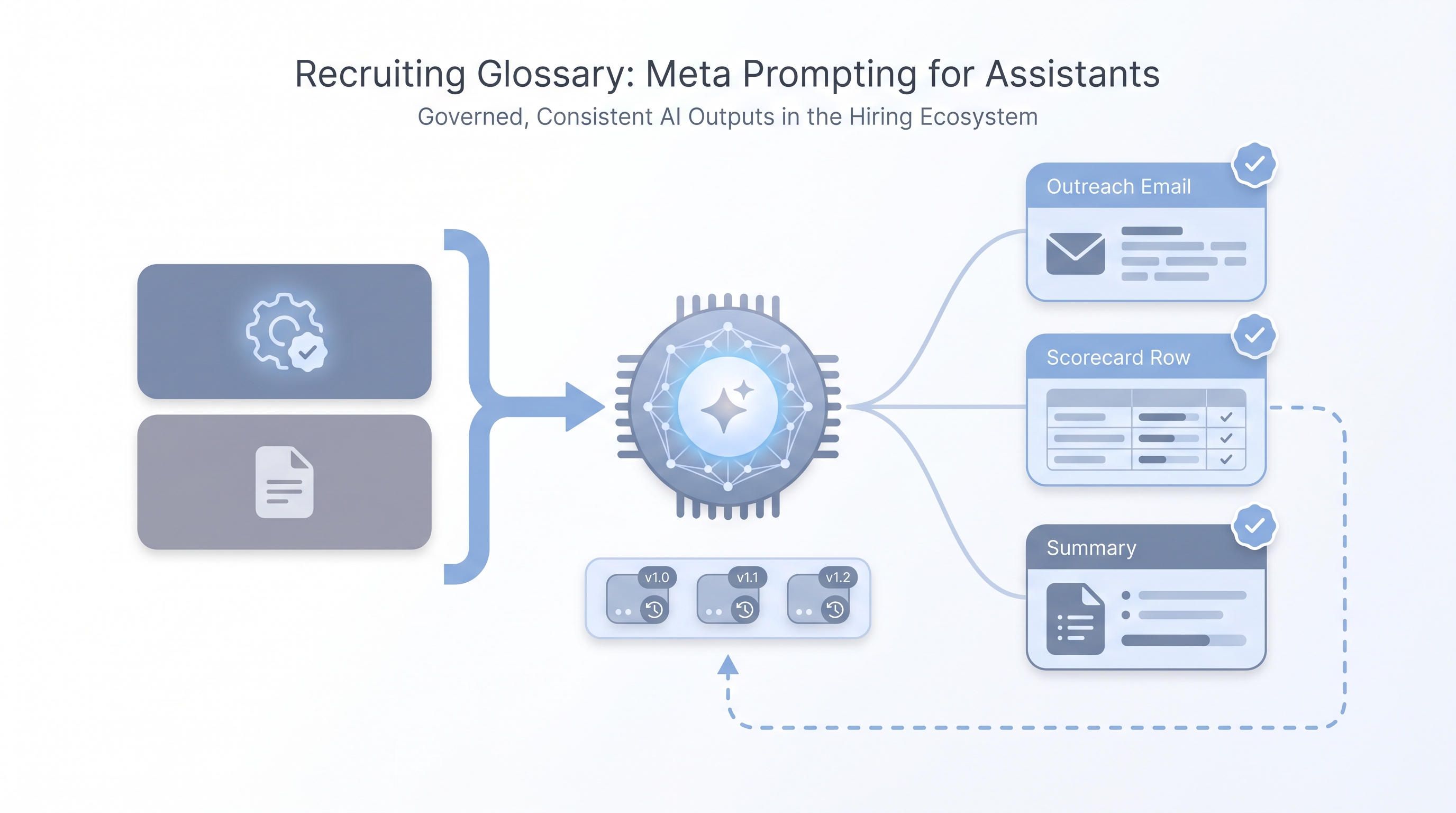
A technique where you write prompts that instruct an AI assistant how to think, respond, and constrain itself, rather than only telling it what task to complete. In recruiting, meta prompts set the role, tone, legal limits, and quality bar before any task-level request.
Michal Juhas · Last reviewed May 5, 2026
What is meta prompting for recruiting assistants?
Meta prompting means writing a prompt that defines how the assistant should think and behave, before you give it any task. For a sourcer or recruiter, this is the difference between pasting "write a LinkedIn message" into a blank chat and opening with a framing block like:
You are a senior technical sourcer. Write concise first-touch outreach that would pass a GDPR review, never makes unverified claims about the role, and ends with a plain opt-out. Keep it under 80 words.
That framing block is the meta prompt. It sets the role, the constraints, the tone floor, and the quality standard. Every task request that follows inherits those rules automatically.
The word "meta" here does not mean abstract or theoretical. It means a prompt about how to prompt: you are telling the model what kind of assistant it is before you ask it to do anything.
In practice
- A TA lead writes one meta prompt block for all outreach drafts that week: role, opt-out requirement, GDPR line, no salary claims. Every recruiter pastes it at the top before their task request. Output consistency jumps immediately.
- A recruiting ops team stores meta prompts in Notion next to their task prompts, with version numbers, so when an output breaks they can audit which framing was in place at the time.
- In workshops, when a recruiter says "the AI keeps making stuff up about company culture," the fix is almost always a missing constraint line in the meta layer, not a different model or a longer task prompt.
Quick read, then how hiring teams use it
This is for recruiters, sourcers, TA, and HR partners who need the same vocabulary in debriefs, vendor calls, and policy reviews. Skim the first section when you need a fast shared picture. Use the second when you are deciding how meta prompting fits into your ATS workflows, sourcing tools, or candidate communications.
Plain-language summary
- What it means for you: Before you ask the AI to write anything, you write a short block that tells it who it is and what the rules are. That block is the meta prompt.
- How you would use it: Open any chat with your role framing: "act as a sourcer who writes GDPR-safe outreach, no salary promises, always include an opt-out." Then paste the task. The meta layer stays constant; only the task changes each session.
- How to get started: Take your worst recent AI output. Ask yourself: was the tone wrong, the format random, or did it invent a claim you never made? Each answer points to a missing line in the meta layer. Add that line and test again.
- When it is a good time: Any time more than one person on the team is prompting the same assistant for the same kind of task. Without shared meta prompts you get inconsistent outputs and no way to diagnose why.
When you are running live reqs and tools
- What it means for you: Meta prompts become a governance layer when you wire them into prompt templates, workflow automation, or no-code recruiting automation flows. The constraint lines you write today are what you can point to in a GDPR audit tomorrow.
- When it is a good time: Before you automate anything candidate-facing. A meta prompt baked into a flow is more reliable than instructions delivered per-run by individual recruiters.
- How to use it: Store meta prompts in a version-controlled agent knowledge base or shared doc with change logs. Pair with system instructions in tools that support persistent configuration.
- How to get started: Write one meta prompt for your most-used recruiting task. Include: role, tone standard, two hard constraints, and one quality bar sentence. Run five test outputs. Fix one gap at a time. Commit the version and share it.
- What to watch for: Meta prompts drift when models update. A constraint that worked in March may need tightening in June after a model change. Schedule a quarterly review the same way you review any process that touches candidate data.
Where we talk about this
On AI with Michal live sessions we work through meta prompting in both the AI in recruiting and sourcing automation tracks. Participants write and break their own meta prompts in real time, not from slides. If you want the room conversation, specific failure modes, and a calibration checklist you can take back to your desk, start at Workshops and bring your real sourcing or screening use case.
Around the web (opinions and rabbit holes)
Third-party creators move fast. Treat these as starting points, not endorsements, and verify anything before you wire it to candidate-facing flows.
YouTube
- Meta Prompting: The Secret Technique to Get Better AI Responses (AI Advantage) covers the framing mechanics before any domain-specific application.
- The Meta Prompt That Changes Everything walks a live comparison of task-only versus meta-framed outputs to show the difference in concrete terms.
- Advanced Prompt Engineering (AssemblyAI) covers meta prompting alongside chain-of-thought and few-shot patterns for practitioners who want the full toolkit.
- Meta prompting vs system prompts, what is the difference? in r/PromptEngineering is a frank practitioner thread with real examples of both, useful for the vocabulary.
- Anyone else using a meta prompt to improve their prompts? in r/ChatGPT covers use cases from multiple roles and industries.
- How do I make ChatGPT understand my context without repeating myself? in r/ChatGPT is the recruiter-practical version of this question: the answers map to exactly what a meta prompt solves.
Quora
- What is meta-prompting in AI? collects several practitioner definitions worth reading side by side before you write your first meta layer.
Meta prompting versus regular prompting
| Regular prompt | Meta prompt | |
|---|---|---|
| What it defines | The specific task | How the assistant approaches all tasks |
| Scope | Single output | All outputs in the session or flow |
| Who typically writes it | Any team member | Team lead or ops, then shared |
| When it changes | Every session | When the role or constraints change |
| GDPR audit value | None | Logs what the assistant was told not to do |
Related on this site
- Glossary: System instructions, Prompt chain, Few-shot prompting, Recruiting prompt library, Agent knowledge base, Human-in-the-loop (HITL), Workflow automation
- Blog: AI sourcing tools for recruiters
- Guides: Sourcers
- Live cohort: Workshops
- Course: Starting with AI: the foundations in recruiting
- Membership: Become a member