Skills versus scripts in AI recruiting systems
The distinction between reusable prompt skills (saved instructions, personas, and templates that adapt to context) and procedural automation scripts (code or fixed flows that execute steps), and knowing which one belongs in each part of a recruiting AI stack.
Michal Juhas · Last reviewed May 5, 2026
What is the skills-versus-scripts distinction in AI recruiting?
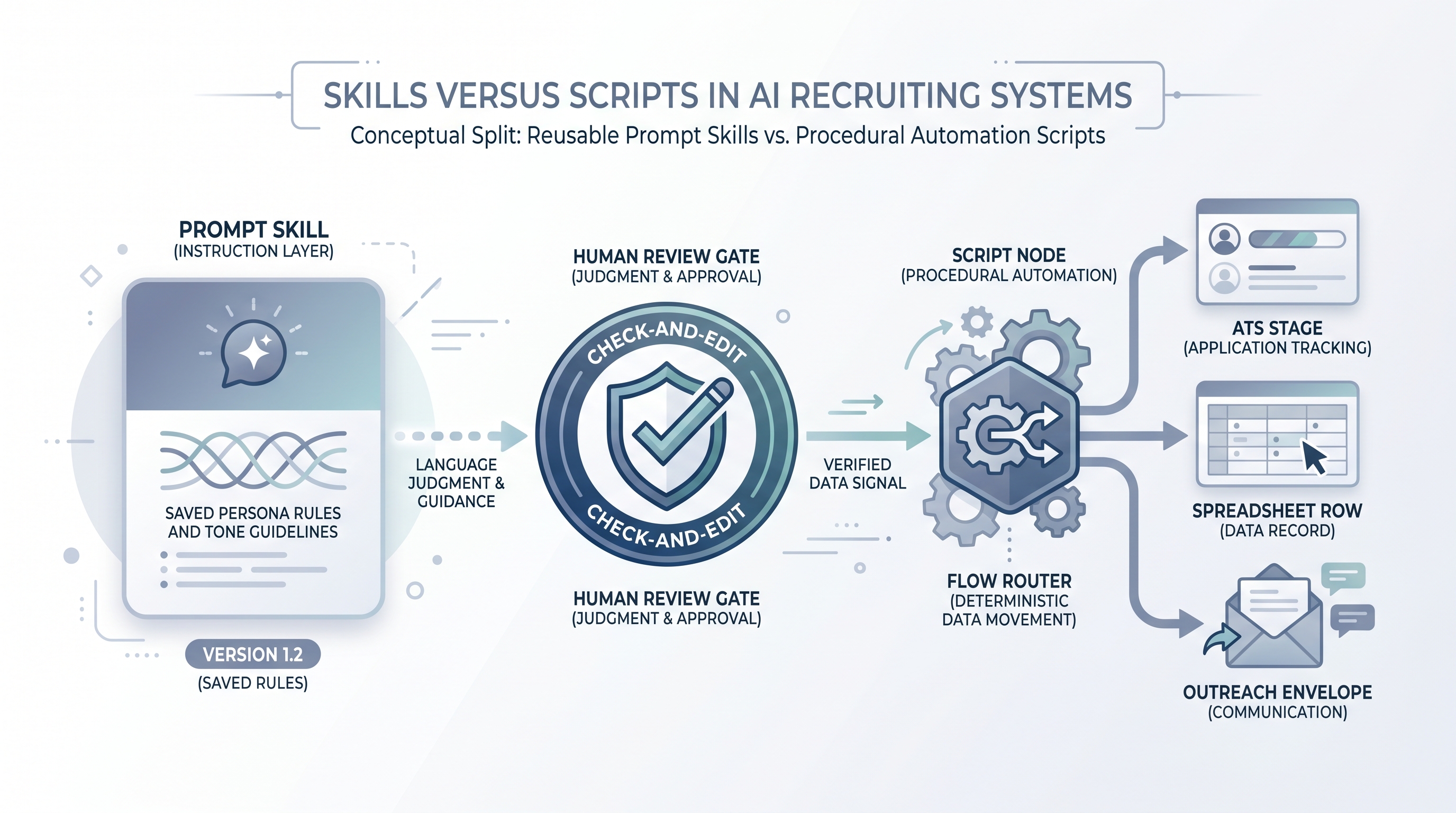
In an AI recruiting stack, a skill is a reusable prompt configuration that an assistant uses to adapt its behaviour: a sourcing persona, an outreach tone rule, a debrief summariser. A script is procedural code or a no-code flow that runs a fixed sequence of steps: moving a candidate stage, triggering a webhook, appending a row to a tracker.
The distinction matters because both break, but in different ways and for different reasons. Skills drift when nobody updates the prompt after job requirements change. Scripts break when an API changes a field name, a rate limit fires mid-campaign, or a retry loop creates duplicate records. Treating each as the other is the root cause of most avoidable failures in recruiting automation.
In practice
- A sourcing team that says "the AI always writes in a direct, two-paragraph style with no jargon" is describing a skill. A team that says "the webhook fires when stage changes to Screen and drops a row in the tracker" is describing a script.
- When a recruiter asks why outreach messages changed tone after a model upgrade, that is a skills governance problem. When a recruiter asks why candidate rows are missing from the ATS this morning, that is a script failure.
- Many recruiting tools blur the line: a no-code automation tool with a built-in AI step is a script calling a skill. Keeping them conceptually separate helps you debug, audit, and hand off ownership cleanly.
Quick read, then how hiring teams use it
This is for recruiters, sourcers, TA ops leads, and HR partners who need the same vocabulary in vendor calls, sprint reviews, and compliance debriefs. Skim the first section for the shared picture; use the second when you are deciding what to build or what broke.
Plain-language summary
- What it means for you: Some AI work is about judgment and language (that is a skill), and some is about moving data reliably (that is a script). Knowing which you are building changes who should own it and how you test it.
- How you would use it: Before building, ask: will this need a human to update it when the job brief changes? If yes, it is probably a skill. Will it run automatically whenever a trigger fires? If yes, it is probably a script.
- How to get started: Audit one existing AI-assisted task. Draw it as three boxes: where does the language judgment happen, and where does data move between systems? That boundary is where skills end and scripts begin.
- When it is a good time: Any time your team is debating whether to use a prompt template, a no-code tool, or a custom integration. Getting this decision right early prevents expensive refactors later.
When you are running live reqs and tools
- What it means for you: Skills and scripts have different owners, different review cycles, and different failure modes. A script that breaks silently can misroute hundreds of candidates before anyone notices. A skill that drifts outputs the wrong tone to every req until someone audits the prompt.
- How to use it: Store skills (prompt templates, system instructions, personas) in a version-controlled location your team can review. Store scripts in your automation tool or repo with a changelog and an error inbox. Log which version of each ran on each req.
- How to get started: Start with one standard operating procedure that names the skill, the script, and the human review gate for one task. Expand from there once the pattern is boring and stable.
- What to watch for: Scripts calling skills with no version pin (a model or prompt update changes outputs without a deploy), retry loops that duplicate data, and candidates who receive messages before a human approval step because the script bypassed the review node.
Where we talk about this
On AI with Michal workshops, the sourcing automation track covers the practical boundary between prompt skills and automation scripts: when to use each, how to wire them together safely, and what to do when one of them breaks in production. The AI in recruiting track connects the same ideas to hiring manager trust and GDPR. If you want the full room conversation, start at Workshops and bring your actual stack, including the tool names and one task where you are unsure whether to prompt or automate.
Around the web (opinions and rabbit holes)
Third-party creators move fast. Treat these as starting points, not endorsements, and verify anything before you wire candidate data.
YouTube
- Search for "prompt engineering vs automation workflow" and "n8n AI recruiting" on YouTube. Content from automation practitioners and AI ops builders covers the skills-versus-scripts decision in production contexts better than most vendor demos.
- "No-code AI recruiting workflow" returns tutorials that show where the prompt skill step sits inside a larger automation script, which is the most useful mental model for new builders.
- r/n8n has active discussion on where to put AI prompt nodes inside automation workflows, with honest accounts of what breaks when the AI step is not isolated from the data-movement steps.
- r/recruiting threads on automation tool choices often surface the skills-versus-scripts tension without naming it: look for questions about "what happens when the template breaks" or "how do we update messages without touching the flow."
Quora
- Search "AI recruiting automation prompt vs script" and "when to use prompt templates vs automation in HR" for a range of practitioner perspectives. Cross-check any specific advice against your own ATS, data protection obligations, and team ownership model before adopting it.
Skills versus scripts comparison
| Dimension | Skill | Script |
|---|---|---|
| Lives in | Prompt template or system instructions | Automation tool, webhook, or code |
| Changes when | Job brief, tone, or criteria change | API, field map, or trigger logic changes |
| Owner | Recruiter or TA ops | TA ops or engineering |
| Failure mode | Prompt drift, output inconsistency | Silent drops, duplicate records, broken field maps |
| GDPR concern | Prompt injection, data in system instructions | Data transfer, retention limits, vendor DPA |
| Testing approach | Human review on sample outputs | Idempotency checks, dead-letter inbox, retries |
Related on this site
- Glossary: Workflow automation, System instructions, Human-in-the-loop (HITL), Recruiting webhooks, No-code recruiting automation, Standard operating procedures for AI recruiting, Prompt chain, Recruiting prompt library, Candidate data enrichment
- Blog: AI sourcing tools for recruiters
- Guides: Sourcers
- Live cohort: Workshops
- Course: Starting with AI: the foundations in recruiting
- Membership: Become a member