Alumni sourcing
Reaching out to former employees as a warm candidate channel, using alumni networks, CRM tools, and AI to identify who left on good terms, track their career growth, and run targeted re-engagement outreach.
Michal Juhas · Last reviewed May 5, 2026
What is alumni sourcing?
Alumni sourcing treats former employees as a warm candidate channel rather than a closed chapter. Because these people already passed your hiring bar, understand your culture, and worked with current team members, they often move through the interview process faster and ramp up more quickly once hired. Sourcing teams sometimes call re-hired alumni boomerang hires.
In practice
- A recruiter might message a former engineer who left eighteen months ago when a senior role opens on the same team, referencing the project they worked on together. That is alumni sourcing in its simplest form.
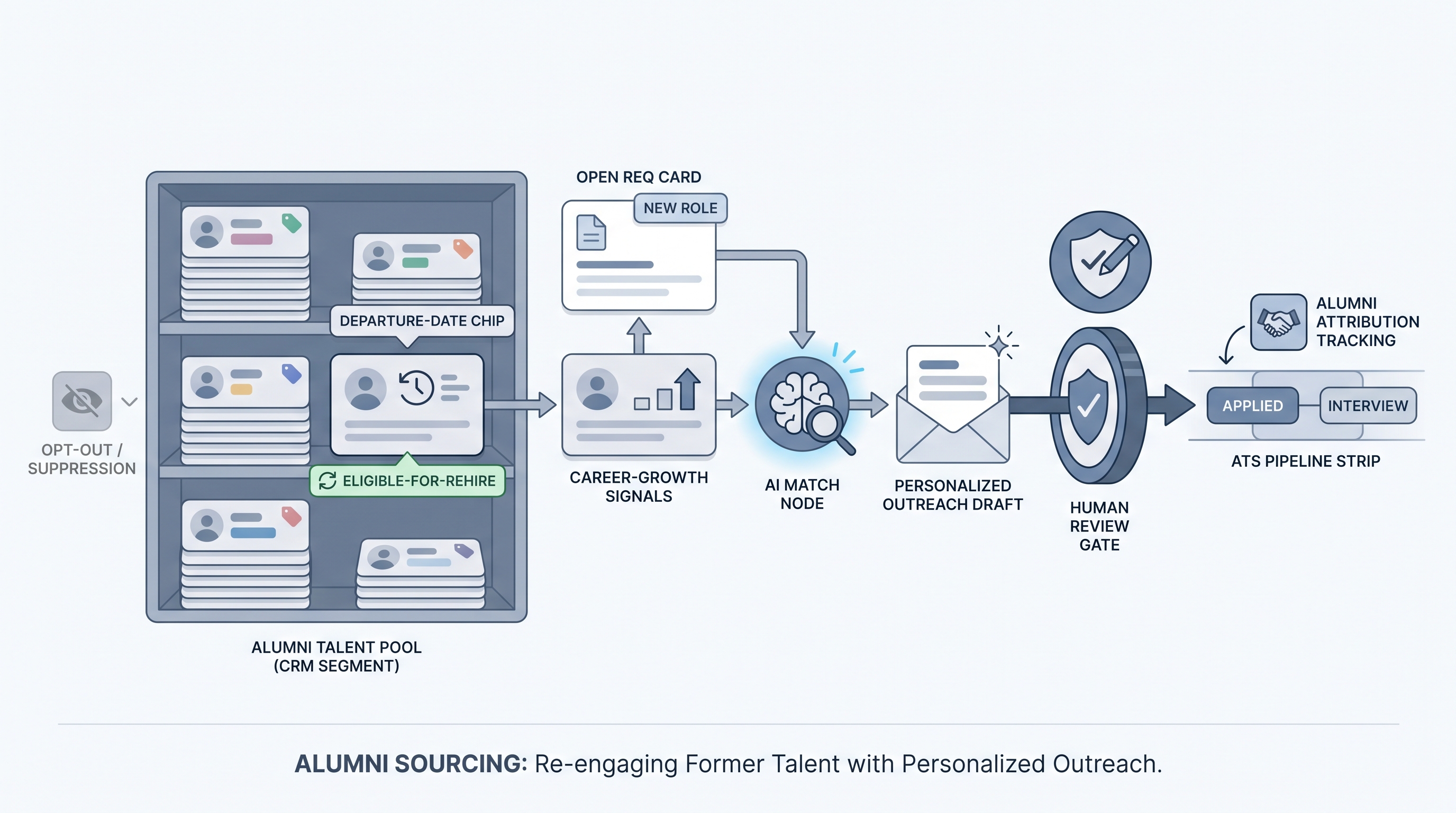
- TA ops teams sometimes build a separate CRM tag for eligible-for-rehire as part of offboarding so the segment is ready to search when reqs open, without re-screening from scratch.
- In a debrief, a sourcer might say "I pulled our alumni list first" before opening any job board, which is shorthand for checking whether a past employee is a better fit than a cold outbound search.
Quick read, then how hiring teams use it
This is for recruiters, sourcers, TA, and HR partners who need the same vocabulary in debriefs, vendor calls, and policy reviews. Skim the first section when you need a fast shared picture. Use the second when you are deciding how it shows up in the ATS, sourcing tools, or candidate communications.
Plain-language summary
- What it means for you: Former employees are a pre-warmed talent source. They already know the role type, the team culture, and how decisions get made, so you spend less time on basics than with cold candidates.
- How you would use it: Tag departing employees as eligible for rehire (or not) during offboarding, keep a CRM segment updated, and check that list first when a matching req opens.
- How to get started: Pull your last two years of voluntary-resignation exits from your HRIS, filter for eligible-for-rehire status, and see how many map to current or pipeline reqs. That is your first alumni candidate batch.
- When it is a good time: When a role opens that closely matches a former employee's last title or current seniority, when your cold outbound pipeline is slow, or when you need faster time-to-productivity for a specialized req.
When you are running live reqs and tools
- What it means for you: Alumni sourcing plugs into your CRM, ATS, and enrichment stack just like any other warm candidate segment. The difference is the data starts in your HRIS offboarding records, not a job board.
- When it is a good time: When you have clean offboarding data with eligible-for-rehire flags, when roles repeat over time (evergreen or near-evergreen reqs), and when your team has a review gate before re-engagement messages go out.
- How to use it: Enrich alumni contact data quarterly using a contact enrichment tool, score against open reqs with a basic match prompt, draft personalized outreach with AI outreach drafting, and require human review before anything sends. Keep a suppression list for anyone who opted out or left under difficult circumstances.
- How to get started: Create a CRM segment for alumni, add eligible-for-rehire as a tag from offboarding, and wire a quarterly enrichment run. Only then build a match prompt. Read outbound talent sourcing before you automate the whole flow.
- What to watch for: Stale contact data (emails and LinkedIn URLs change fast), GDPR retention limits on personal data for former employees, hallucinated tenure details in AI-drafted messages, and anyone flagged as not eligible for rehire slipping into outreach batches. Plan your suppression logic before your first send.
Where we talk about this
On AI with Michal live sessions, sourcing automation blocks cover CRM segment building, warm-candidate match prompts, and suppression logic for alumni and referral pools. The AI in recruiting track ties the same practices to hiring manager trust and compliance. If you want the full room conversation with real stack questions, start at Workshops.
Around the web (opinions and rabbit holes)
Third-party creators move fast. Treat these as starting points, not endorsements, and double-check anything before you wire candidate data.
YouTube
- Boomerang Employees: How to Hire Former Employees Back on YouTube has practitioner walkthroughs covering the business case, interview adjustments, and onboarding considerations for re-hires.
- Alumni Talent Pool Strategy for Recruiting surfaces TA and sourcing channel discussions on CRM setup, tagging conventions, and re-engagement cadence from multiple practitioners.
- Has anyone successfully re-hired former employees? in r/recruiting covers what sourcers actually see in alumni campaigns: conversion rates, culture re-entry, and how to handle the "why did they leave" question.
- Alumni sourcing and boomerang hire programs in r/RecruitmentAgencies surfaces agency-side experience managing alumni pools at scale.
Quora
- What are the benefits of hiring former employees (boomerang hires)? collects practitioner views on conversion, ramp time, and culture risk from multiple industries.
Alumni re-hire versus cold outbound
| Factor | Alumni re-hire | Cold outbound |
|---|---|---|
| Culture familiarity | High (pre-verified) | None at start |
| Data freshness | Stale without enrichment | Depends on source |
| Conversion speed | Often faster | Slower |
| GDPR risk | Real: retention limits apply | Real: lawful basis needed |
| Message personalization | Easy: reference real tenure | Harder without research |
Related on this site
- Glossary: Outbound talent sourcing, Talent community sourcing, Employee referral sourcing activation, Proprietary talent pool, Contact enrichment sourcing, AI outreach drafting, GDPR first-touch outreach
- Blog: AI sourcing tools for recruiters
- Guides: Sourcers
- Live cohort: Workshops
- Membership: Become a member
- Course: Starting with AI: the foundations in recruiting