Applicant tracking system for small business
An ATS configured for teams hiring fewer than 50 people per year, prioritizing ease of setup, low per-seat costs, and straightforward job posting and candidate pipeline management over the deep integrations and compliance automation that enterprise platforms require.
Michal Juhas · Last reviewed May 4, 2026
What is an applicant tracking system for small business?
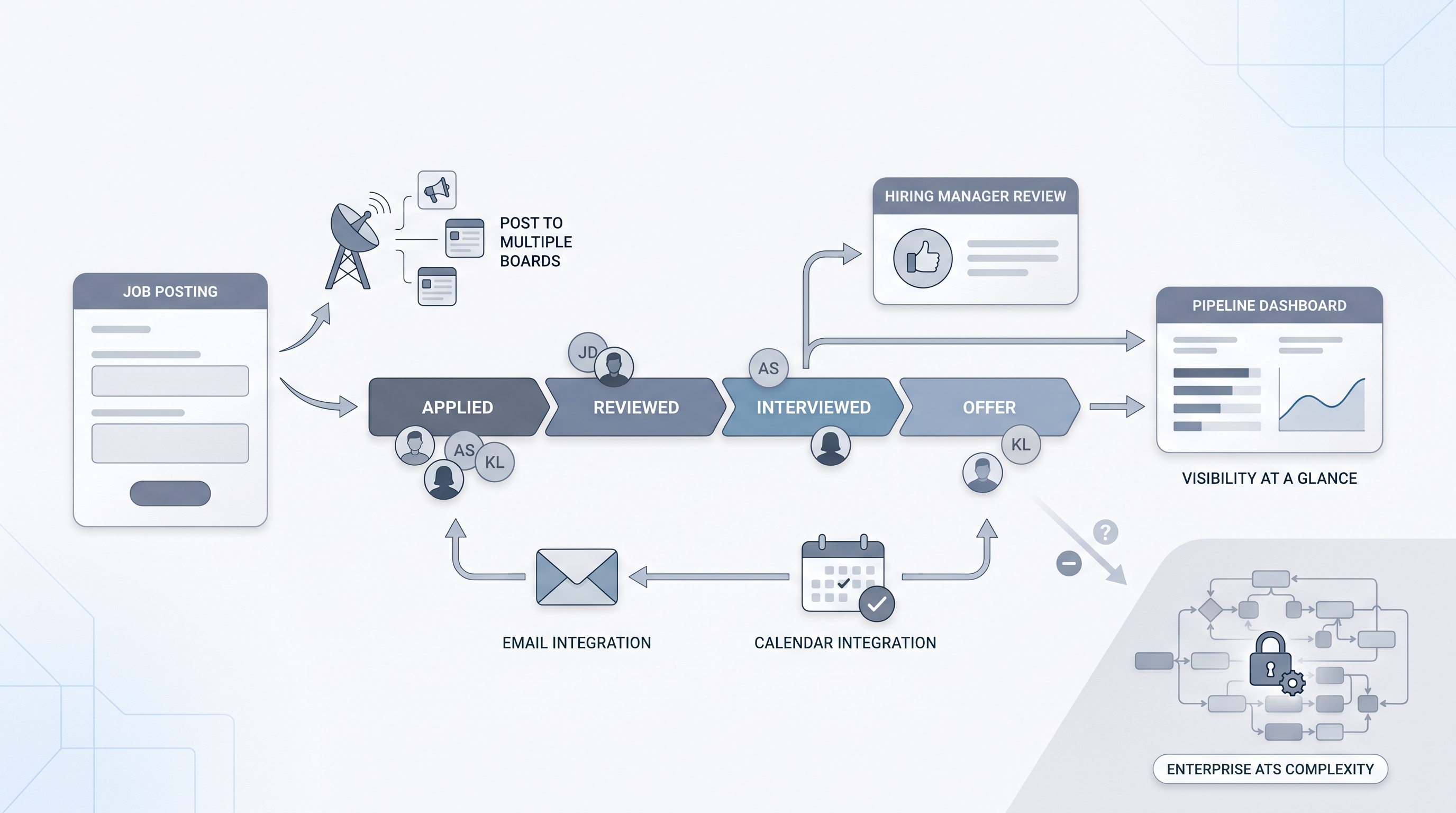
An applicant tracking system for small business is an ATS configured, priced, and designed for teams making fewer than 50 hires per year. These platforms prioritize fast setup over configuration depth, straightforward pipeline management over advanced workflow automation, and low per-seat pricing over the deep integrations that enterprise recruiting teams require.
The category exists because enterprise ATS platforms like Greenhouse or Workday are built for dedicated TA functions with ops support, compliance specialists, and months of implementation time. A 15-person company hiring a few engineers and a sales lead needs centralized candidate records, job board posting, and interview scheduling without a three-month onboarding project.
In practice
- A 25-person startup founder who says "we are drowning in CVs in five different email threads" is describing the exact coordination problem a small business ATS solves: a single place where every hiring manager can see every candidate in every stage.
- When a generalist HR person asks "can hiring managers use this without training?" they are testing for the adoption risk that kills ATS rollouts at small companies - if the tool takes more than three clicks to review and respond to a candidate, hiring managers route around it.
- A small business skipping candidate data retention rules because "we are too small to matter" is making the same compliance mistake that large companies make; GDPR and local data protection obligations apply based on what data you process, not how many employees you have.
Quick read, then how hiring teams use it
This is for founders, HR generalists, and first-time TA hires at small businesses who are setting up a recruiting process for the first time or replacing a spreadsheet that has started to break. Skim the first section for the vocabulary. Use the second when you are evaluating specific tools.
Plain-language summary
- What it means for you: An ATS for a small business is a central place where every candidate in every open role has a stage, a history, and a next action, so you stop losing people in email threads.
- How you would use it: Post jobs, collect applications, move candidates through stages (applied, phone screen, interview, offer), and log notes so any team member can see where things stand.
- How to get started: Map the stages every hire goes through today, even if they happen in email. That process map is your ATS configuration. Then trial two tools on one real open role before choosing.
- When it is a good time: As soon as you have more than two open roles at once or more than 20 applications per role coming in.
When you are running live reqs and tools
- What it means for you: The ATS is only useful if hiring managers log into it. Email and calendar integration is the single feature most correlated with adoption outside the recruiting function.
- When it is a good time: Before you post the next job, not after you are already managing candidates in email and need to migrate.
- How to use it: Connect to your job boards from setup day one. Integrate with the email and calendar tools your hiring managers already use. Set a data retention policy before the first application arrives.
- How to get started: Pick one role type to trial, configure the pipeline stages, post to two job boards, and measure how long it takes a hiring manager to advance a candidate without your help.
- What to watch for: Per-job-posting pricing that penalizes you for activity. Tools that require admin support to configure stages. ATS platforms that make data export difficult when you decide to switch.
Where we talk about this
On AI with Michal live sessions ATS setup for smaller teams comes up in the AI in recruiting track when we discuss which tools to configure before adding AI features on top. The sequencing matters: a well-configured ATS with consistent stage data is what makes later workflow automation and analytics meaningful. Bring your current tool list and the biggest coordination friction point to Workshops for a practical discussion on what to set up first.
Around the web (opinions and rabbit holes)
Small business ATS recommendations shift quickly as pricing and feature sets evolve. These are starting points; test any tool on a real open role before committing a contract.
YouTube
- Best ATS for small business 2025 covers walkthroughs of lightweight ATS platforms with setup time and hiring manager adoption as the key criteria.
- How to set up an ATS for a startup includes step-by-step configuration guides from founders and HR generalists who did it without a TA ops team.
- Small business hiring process tools shows practical comparison of ATS tools at the SMB tier with real company sizes and hiring volumes as context.
- Best ATS for small teams in r/recruiting collects candid reviews from practitioners managing recruiting at sub-50-person companies.
- ATS for a startup without a recruiter in r/startups surfaces founder-perspective recommendations on tools that work without dedicated HR.
- Workable vs Recruitee vs Breezy in r/recruiting includes head-to-head notes from teams who switched between platforms at small business scale.
Quora
- What is the best ATS for small businesses? gathers practitioner recommendations with context on company size and hiring volume; read critically and cross-reference with recent reviews.
Small business ATS versus enterprise ATS
| Dimension | Small business ATS | Enterprise ATS |
|---|---|---|
| Setup time | Hours to days | Weeks to months |
| Configuration depth | Pre-set stages, limited custom workflow | Fully configurable, complex approval chains |
| Typical pricing | Per seat or per month, flat | Per seat plus implementation plus modules |
| Compliance tooling | Basic data retention and export | EEOC reporting, multi-jurisdiction, audit logs |
| Integration ecosystem | Email, calendar, major job boards | HRIS, payroll, background check, SSO, API |
| Best for | Under 50 hires per year, small HR function | 100-plus hires per year, dedicated TA ops |
Related on this site
- Glossary: Applicant tracking software, Best applicant tracking software, Best applicant tracking system, Hiring tools, Workflow automation, ATS API integration, Recruiting email automation, Adverse impact
- Guides: Sourcers
- Workshops: AI in recruiting
- Membership: Become a member
- Courses: Starting with AI: the foundations in recruiting