Best video interview software
Video interview software covers platforms that host live or recorded candidate screening sessions: from general video-call tools to dedicated one-way platforms with structured prompts, rubric-tied scoring, and optional AI overlays. The best choice for a team is the one that fits their volume, ATS, and compliance requirements, not the one with the longest feature list.
Michal Juhas · Last reviewed May 5, 2026
What is best video interview software?
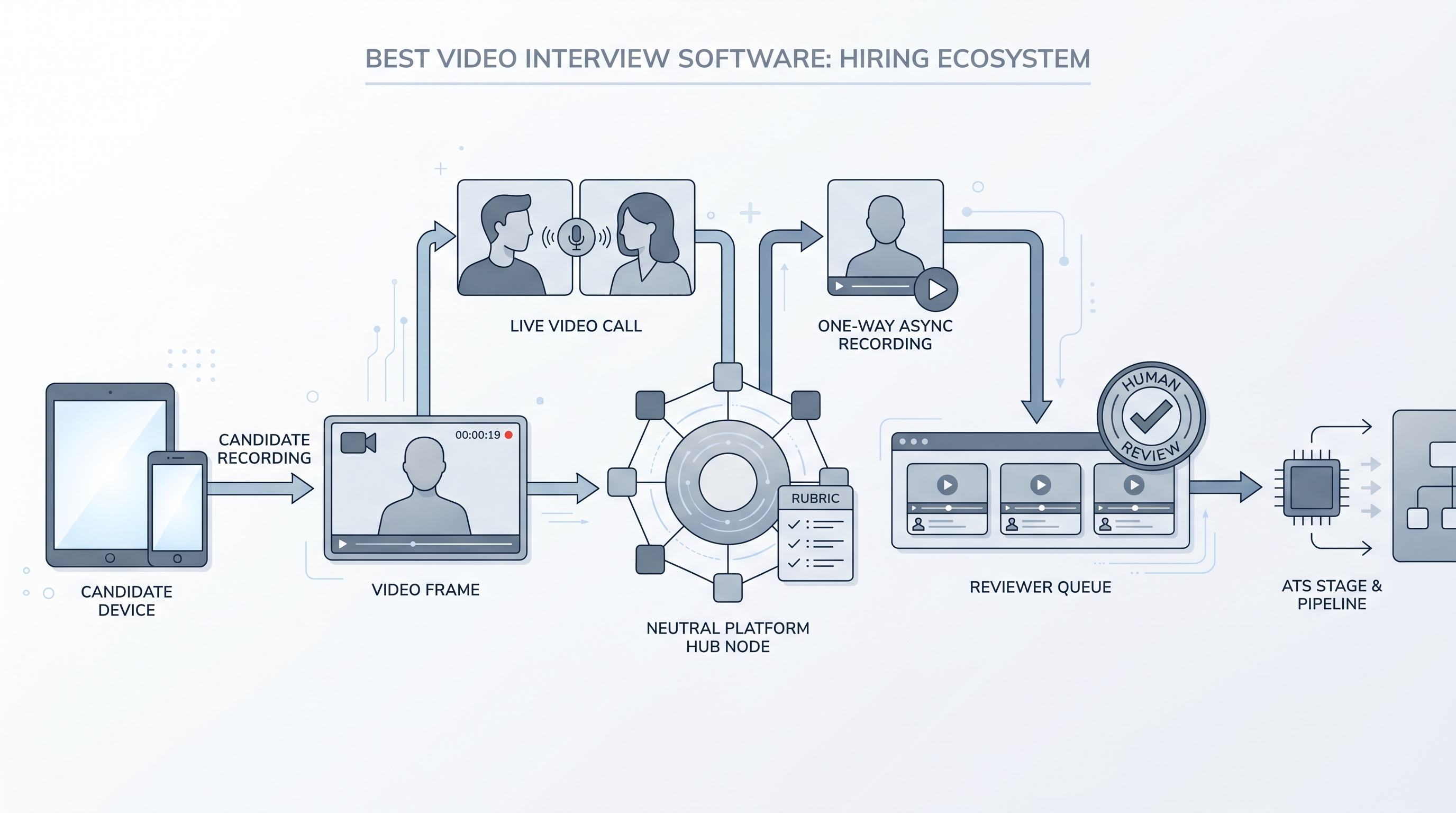
Video interview software covers any platform that hosts candidate screening sessions over video, whether live or recorded. Two formats dominate hiring today: general video-call tools such as Zoom, Microsoft Teams, or Google Meet, where both parties join at the same time; and purpose-built one-way platforms such as HireVue, Spark Hire, Willo, or myInterview, where candidates record preset answers that reviewers watch later. The best platform for a given team is the one that matches actual volume, ATS integrations, and compliance requirements, not the one with the most AI features on the demo slide.
In practice
- A TA team running 50 phone screens per week pilots Spark Hire for the first round on two roles. They set four structured questions, a 90-second limit per answer, and a rubric tied to the scorecard. By week three, volume drops from 50 scheduled calls to 12 live conversations.
- Candidates in r/recruiting and r/jobs call the format "the video thing I had to do before the phone screen." They complete it on a phone in an evening, often in a single sitting, and expect a reply within a week.
- A TA ops lead briefing a hiring manager distinguishes between the two formats: live video is the same as a phone screen with faces; async video is a different workflow that needs consent language, a rubric, and a committed reply SLA before any candidate sees a link.
Quick read, then how hiring teams use it
This is for recruiters, sourcers, TA, and HR partners who need the same vocabulary in debriefs, vendor calls, and policy reviews. Skim the first section for a fast shared picture. Use the second when you are deciding how video interview software fits into your ATS and screening stack.
Plain-language summary
- What it means for you: Instead of booking 30 phone screens, you send a link. Candidates record two to four questions on their own time. You and the hiring manager watch clips later, together or asynchronously.
- How you would use it: For early funnel roles where the same questions appear on every call, volume is high, and scheduling is the real bottleneck, not the quality of conversation.
- How to get started: Write the three questions you ask on every first screen. Add a rubric for each question. Pilot on one role with more than 15 applications per week and a stable job description. Resolve consent language before the first invite goes out.
- When it is a good time: When scheduling is the constraint, when hiring managers want pre-screen signal before committing calendar time, and when you can staff a human review gate within five business days of clip submission.
When you are running live reqs and tools
- What it means for you: Video interview software is a scheduling trade for async formats and a collaboration tool for live. The async format gains throughput and loses follow-up questions. Pair it with a rubric and a reply SLA or you get faster screening with the same bias patterns running at higher volume.
- When it is a good time: When intake spikes from programmatic advertising or automated outreach, when hiring managers decline to calendar screen calls, or when the same five questions appear on every first call for a stable role.
- How to use it: Wire the vendor into your ATS so reviewed clips trigger stage moves automatically. Keep AI-generated scores off the official record until you have audited them for adverse impact. Use structured output patterns when exporting review notes back to the ATS.
- How to get started: Request the data processing agreement before any demo. Confirm mobile and low-bandwidth completion works end to end. Test the consent flow with legal before inviting candidates. Resolve caption and accommodation requirements upfront, not after a complaint.
- What to watch for: Completion drop-off after the invite link goes out, ghosting post-submission, automated scoring overlays legal has not reviewed, and vendor subprocessors who receive clip data outside your required data region.
Where we talk about this
On AI with Michal live sessions, async screening and video tooling come up in both the AI in recruiting and sourcing automation tracks: where does human review need to stay, what does the rubric need to say, and how do you brief candidates so they trust the format. If your team is deciding whether to add, replace, or remove a video interview step, bring the real policy constraints and your current ATS name to Workshops and work through them with practitioners who have run both sides of the process.
Around the web (opinions and rabbit holes)
Third-party creators move fast. Treat these as starting points, not endorsements, and double-check anything before you wire candidate data.
YouTube
- Best Video Interview Software Reviews has practitioner walk-throughs comparing HireVue, Spark Hire, Willo, and similar platforms on candidate experience and ATS integration.
- One-Way Video Interview Platform Comparison covers side-by-side demos useful for narrowing a vendor shortlist before your own pilot.
- AI Video Interview Bias and Risk surfaces the compliance and bias conversations worth watching before accepting any automated scoring feature from a vendor.
- What video interview software does your team actually use? in r/recruiting collects honest practitioner answers on which platforms survive past the first month.
- Async video interview completion rates and ghosting in r/recruiting surfaces the candidate experience problems teams discover after launch, not before.
- HireVue alternatives and video screening tools in r/recruiting is a practical comparison thread across team sizes and budgets.
Quora
- What is the best video interviewing software for hiring? collects practitioner perspectives on platforms across industries (quality varies, read critically).
Live versus one-way video
| Factor | Live video tool | One-way video platform |
|---|---|---|
| Scheduling | Both parties must align | Candidate picks own time |
| Follow-up questions | Available in real time | Not available |
| AI scoring risk | Lower (no clip capture) | Higher if overlays are enabled |
| Volume ceiling | Bottlenecks at recruiter hours | Scales to hundreds of reviews |
| Candidate friction | Familiar UX (Zoom, Teams) | New platform, new consent step |
Related on this site
- Glossary: One-way video interview, Async screening, Scorecard, Human-in-the-loop (HITL), Adverse impact (selection), AI bias audit, Structured output, Workflow automation
- Blog: AI candidate screening
- Guides: Talent acquisition managers
- Course: Starting with AI: the foundations in recruiting
- Live cohort: Workshops
- Membership: Become a member