AI for recruiters
The practical set of AI tools, prompts, and techniques individual recruiters use day-to-day: drafting outreach and job descriptions, summarising screening calls, triaging inbound resumes, and building smarter searches, while keeping judgment calls human.
Michal Juhas · Last reviewed May 4, 2026
What is AI for recruiters?
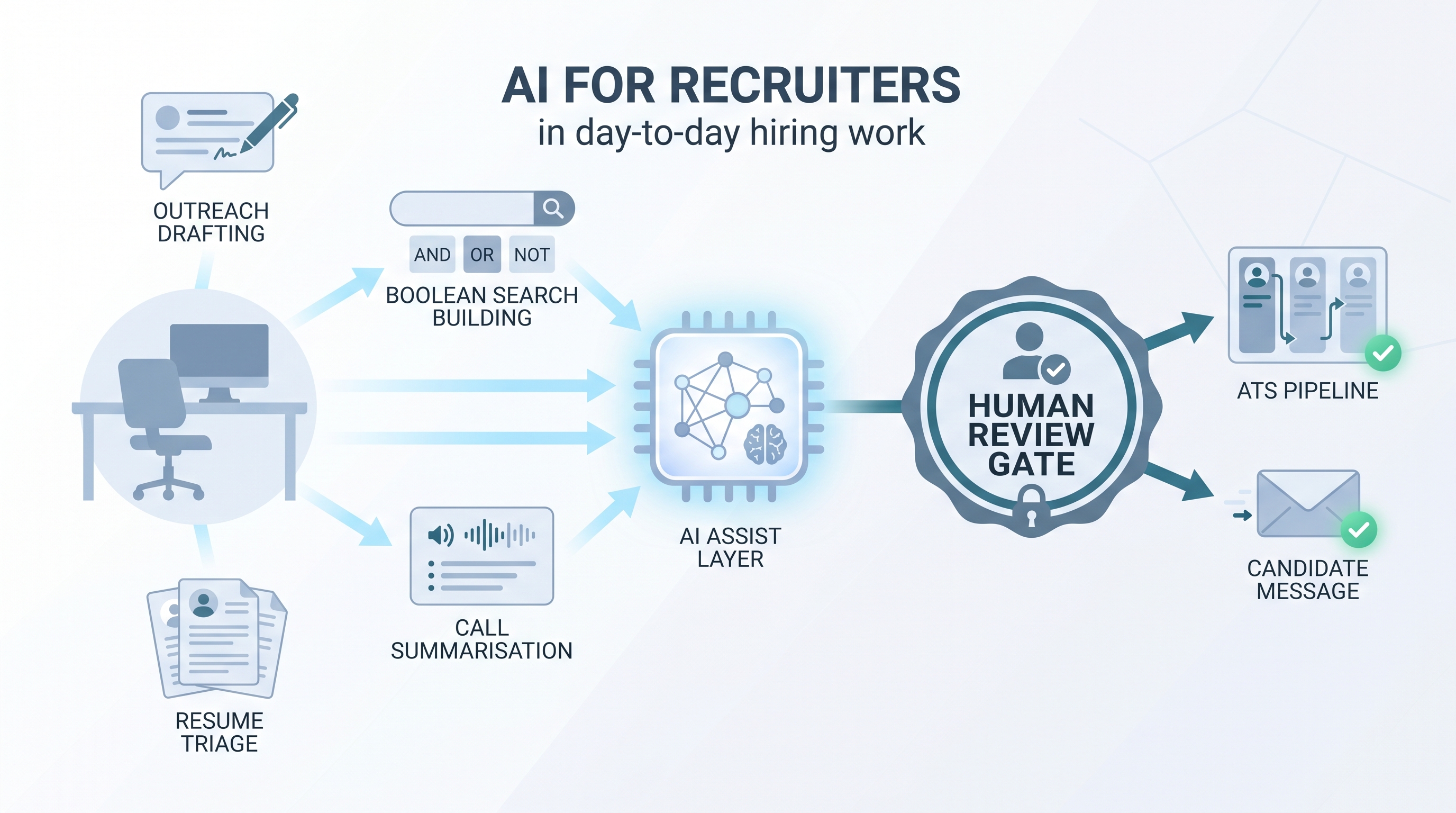
AI for recruiters means using language models, AI-assisted features, and light automation to handle the production work that surrounds every hiring decision: first drafts, Boolean queries, call summaries, resume triage, and pipeline reports.
The term is narrower than the team-level view of AI in recruiting and closer to the individual practitioner: one recruiter, one req, and a set of tools that save 30 to 90 minutes per role on tasks that used to require manual effort at every step.
In practice
- A sourcer describes a product manager role in one paragraph and asks an LLM to generate five Boolean search strings for LinkedIn Recruiter. She edits two, discards three, and runs her search in half the usual time.
- A full-cycle recruiter uses a prompt chain to turn raw call notes into five structured scorecard bullets, then pastes them into the ATS. Hiring managers stop waiting two days for written feedback.
- A TA ops lead wires a webhook so every new inbound application is summarised against a must-haves rubric and routed to a review queue. The recruiter reads the AI summary first, then opens the full resume for shortlisted candidates.
Quick read, then how hiring teams use it
This is for recruiters, sourcers, TA partners, and HR leaders who need a working definition and a practical starting point. Skim the first section for the shared vocabulary. Use the second when you are deciding what to try, build, or evaluate.
Plain-language summary
- What it means for you: AI for recruiters is a label for any tool or technique that lets you produce a first draft, run a smarter search, or get a cleaner summary faster than you could by hand, while keeping the decision yours.
- How you would use it: You connect AI to one task you already do (outreach, notes, queries), give it a prompt that matches your standards, review the output, and only then send or save it.
- How to get started: Pick one output you produce more than three times a week. Write a prompt, compare AI output to your own work for two weeks, then decide whether it saves real time.
- When it is a good time: After you know what a good output looks like for this task and can spot a bad one in 30 seconds. Not while the process is still changing every week.
When you are running live reqs and tools
- What it means for you: AI for recruiters shifts your time from production (drafts, queries, note formatting) to judgment (calibration, relationships, offers). That trade-off only holds if outputs are reviewed before they reach a candidate record or inbox.
- When it is a good time: After you have stable prompts, a review habit, and a clear owner for errors. Workflow automation that fires before those conditions exist creates more problems than it saves.
- How to use it: Pair a drafting or summarisation step with your existing ATS and comms stack. Keep candidate-facing sends behind your own review. Log which prompt produced which output so compliance questions have an answer.
- How to get started: Start with call summaries or job description drafts. Ship one integration with a review step before you add a second. Read AI in recruiting for the funnel-wide view of where AI connects to the whole team's work.
- What to watch for: Confident wrong output, stale data passed through as true, and free-tier LLMs that may train on pasted candidate profiles in violation of your DPA.
Where we talk about this
On AI with Michal sessions, "AI for recruiters" is the entry point for practitioners who want to build a personal workflow before joining a team-wide rollout. The AI in recruiting workshop track covers the full funnel with live tool demos and real req briefs. The sourcing automation track goes deeper on outreach sequences and ATS integrations. Both tracks are designed for working recruiters: bring a live role and a real brief, and leave with something you can run the next morning. Start at Workshops.
Around the web (opinions and rabbit holes)
Third-party creators move fast. Treat these as starting points, not endorsements, and verify compliance postures and vendor details directly before wiring candidate data to any script you find in a tutorial.
YouTube
- AI in Recruiting: What Talent Teams Need to Know covers the practical landscape for TA teams adopting AI tools across the funnel.
- Introduction to Generative AI (Google Cloud Tech) explains the foundation models behind most AI for recruiters tools, useful for pressure-testing vendor claims.
- AI Bias and Fairness Explained (IBM Technology) covers the algorithmic fairness concepts that apply whenever an AI system scores or ranks candidates.
- How are you actually using AI in your recruiting workflow right now? in r/recruiting is a candid survey of tools and use cases from practitioners in the chair.
- AI tools for recruiting: 6 months in, what worked and what did not in r/recruiting is honest about failure modes you do not see in vendor demos.
- Has AI made recruiting easier or just different? in r/Recruitment covers efficiency gains and the adoption anxiety that surfaces in teams.
Quora
- How can AI be used in the hiring process? collects practitioner answers across sourcing, screening, and scheduling use cases.
AI for recruiters versus AI for the TA function
| Scope | AI for recruiters | AI for the TA function |
|---|---|---|
| Decision owner | Individual recruiter | TA ops, head of TA, or legal |
| Typical tools | Prompts, browser AI, ATS embedded features | Platforms, automations, API integrations |
| Risk surface | Personal DPA, tone errors, single candidate | Systematic bias, compliance at scale, legal exposure |
| Starting point | One prompt for one repeated task | Vendor evaluation, legal review, rollout plan |
Related on this site
- Glossary: AI in recruiting, AI for hiring, AI recruiting tools, Human-in-the-loop, Workflow automation, Scorecard, AI adoption ladder, AI bias audit, Resume parsing
- Blog: AI sourcing tools for recruiters
- Guides: Sourcers
- Workshops: AI in recruiting
- Courses: Starting with AI: the foundations in recruiting
- Membership: Become a member