Multimodal AI in hiring
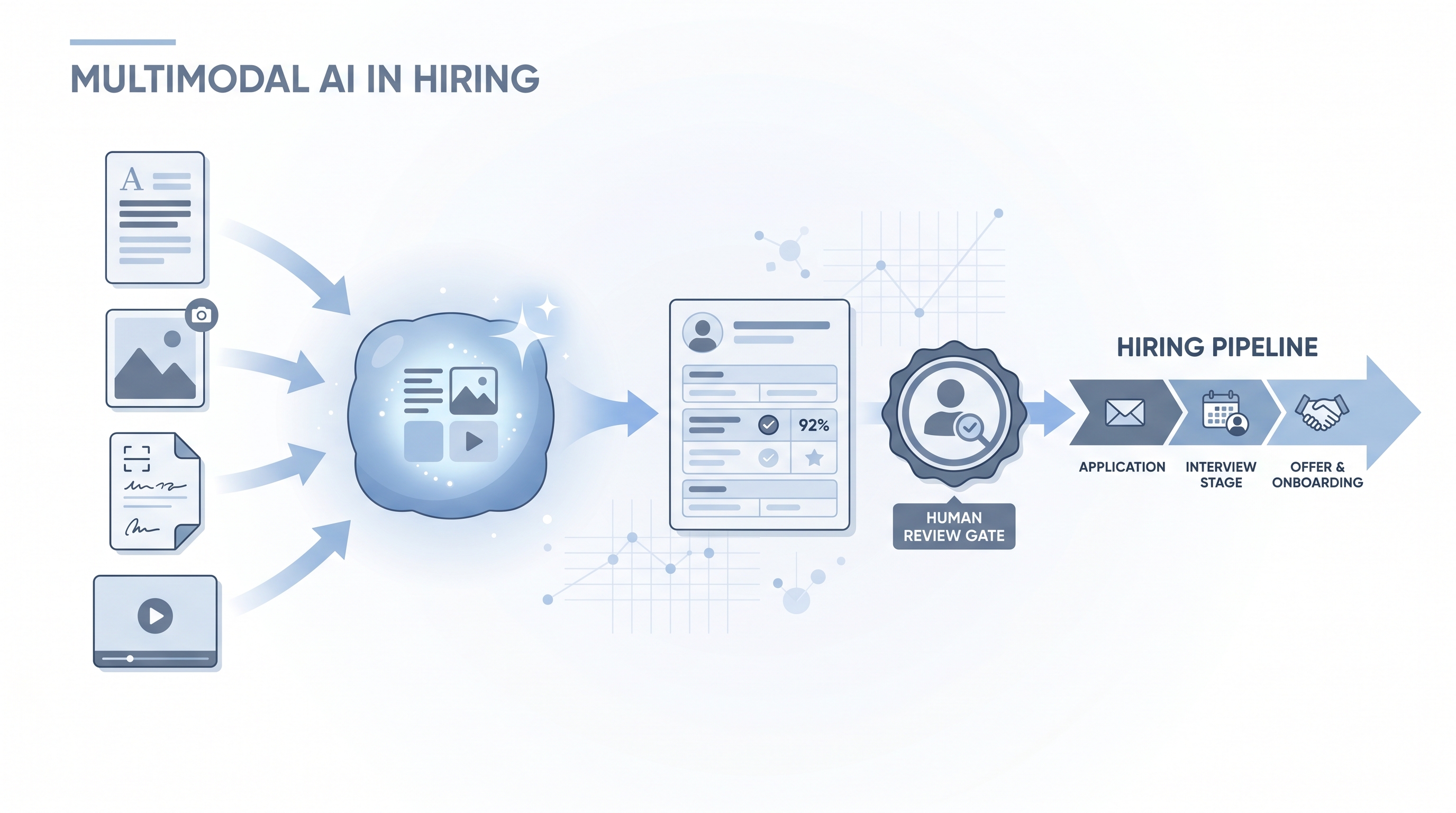
AI that processes text alongside images, audio, video, and structured documents in a single session, letting hiring teams analyze portfolios, scanned references, whiteboard photos, and complex PDF layouts without converting formats first.
Michal Juhas · Last reviewed May 5, 2026
What is multimodal AI in hiring?
Multimodal AI processes more than one type of input in a single session. Instead of text only, a multimodal model can read a job description and an attached portfolio screenshot together, extract a table from a scanned reference letter, or describe the structure of a whiteboard photo from a technical interview. In hiring, this matters because candidate materials rarely arrive as clean text: resumes use design columns, applications include PDFs with embedded images, and interview evidence sometimes exists as photographs or short clips.
The shift from text-only to multimodal is less about AI becoming smarter and more about it covering more of the actual document formats recruiters already work with.
In practice
- A sourcer uploads a designer's portfolio PDF to a multimodal model and asks it to list the tools and project types it can identify, reducing the time needed to assess fit before a call.
- A technical recruiter photographs a candidate's whiteboard solution after an onsite and asks the model to describe the approach and flag gaps against the role's criteria, then uses that as a starting point for scorecard notes.
- A hiring operations team tests whether a multimodal model extracts structured data from scanned reference letters more cleanly than the ATS native parser, which strips layout and misreads multi-column formats.
Quick read, then how hiring teams use it
This is for recruiters, sourcers, TA, and HR partners who need the same vocabulary in debriefs, vendor calls, and policy reviews. Skim the first section when you need a fast shared picture. Use the second when you are deciding how multimodal inputs change what your tools can do and what risks they introduce.
Plain-language summary
- What it means for you: Your AI assistant can now read images, PDFs with visual layouts, and short clips alongside text, so you can feed it a portfolio or a scanned letter rather than only a plain-text resume.
- How you would use it: Submit the document in its original format, describe what you want extracted or summarised, and review the output before using it in a hiring decision.
- How to get started: Test on five to ten documents you already know well. Compare the model's output against what you see manually. Fix gaps in your prompt before you trust the extraction.
- When it is a good time: When the candidate's material lives in a non-text format that your ATS parser handles poorly, and when a human reviewer is available to check the output before it enters a record.
When you are running live reqs and tools
- What it means for you: Multimodal inputs expand which steps in the hiring pipeline can have AI assistance, from portfolio-heavy creative roles to technical assessment review, but they also expand the surface area for bias and compliance risk.
- When it is a good time: After you have a human-in-the-loop review gate wired into the workflow and after legal has confirmed the lawful basis for processing the document type, especially for audio and video.
- How to use it: Feed the original document with a structured extraction prompt. Log the model name and version alongside every output. Do not route multimodal outputs directly to candidate-facing actions or ATS records without a reviewer in the chain.
- How to get started: Run a batch extraction test on ten historical documents with known outcomes. Measure extraction accuracy before building automation around the output. Read the data processing addendum for any tool you use with real candidate files.
- What to watch for: Hallucination on visual content, especially handwritten or low-resolution inputs. Bias from appearance-correlated signals in video or photo inputs. Consent and lawful basis gaps when processing audio or video under GDPR. Model drift when vendors update underlying models behind the same product name.
Where we talk about this
On AI with Michal live sessions, multimodal AI comes up most in the AI in recruiting blocks when teams work through document-heavy workflows: portfolio review, technical assessment scoring, and multiformat resume parsing. If your stack includes roles where candidates submit visual work, the live cohort setting lets you test extraction prompts on real documents and hear which formats produce reliable outputs versus hallucination patterns. Start at Workshops and bring a sample file that currently defeats your parser.
Around the web (opinions and rabbit holes)
Third-party creators move fast. Treat these as starting points, not endorsements, and double-check anything before you wire candidate data.
YouTube
- Search "multimodal AI document processing" on YouTube to find walkthroughs of image and PDF inputs across GPT-4o, Gemini, and Claude. Practitioner-run sessions with real files are more useful than vendor demos for setting accuracy expectations.
- Search "AI resume parsing portfolio review" for recruiting-specific demos that surface the common failure modes around layout and low-resolution scans.
- r/recruiting threads on AI document tools surface real parser failures and workarounds that vendors do not cover in their documentation.
- r/humanresources discussions on AI screening compliance often raise GDPR questions about audio and video processing that go unanswered in most tool guides.
Quora
- How can AI be used to evaluate candidate portfolios? collects practitioner and researcher perspectives on visual evaluation in hiring (quality varies; read critically).
Multimodal versus text-only AI in hiring
| Capability | Text-only | Multimodal |
|---|---|---|
| Styled PDF resumes | Partial, loses layout | Reads layout and content together |
| Portfolio screenshots | Not possible | Describes visual elements |
| Scanned reference letters | Requires OCR step first | Processes as image directly |
| Video or audio clips | Transcript only | Processes frames and audio together |
| Bias surface area | Lower | Higher, includes visual signals |
| Compliance complexity | Standard text data rules | May include biometric-adjacent data rules |
Related on this site
- Glossary: AI bias audit, One-way video interview, Hallucination, Human-in-the-loop (HITL), Resume parsing, Structured output
- Glossary: Gemini in hiring, ChatGPT for recruiters, Claude in recruiting
- Blog: AI sourcing tools for recruiters
- Live cohort: Workshops
- Membership: Become a member