Recruitment agency software
Software built for staffing and executive search firms that combines a candidate talent database, job order tracking, client relationship management, and placement fee reporting in one platform, handling the two-sided business an agency runs across both the candidates it places and the client companies that pay the fee.
Michal Juhas · Last reviewed May 4, 2026
What is recruitment agency software?
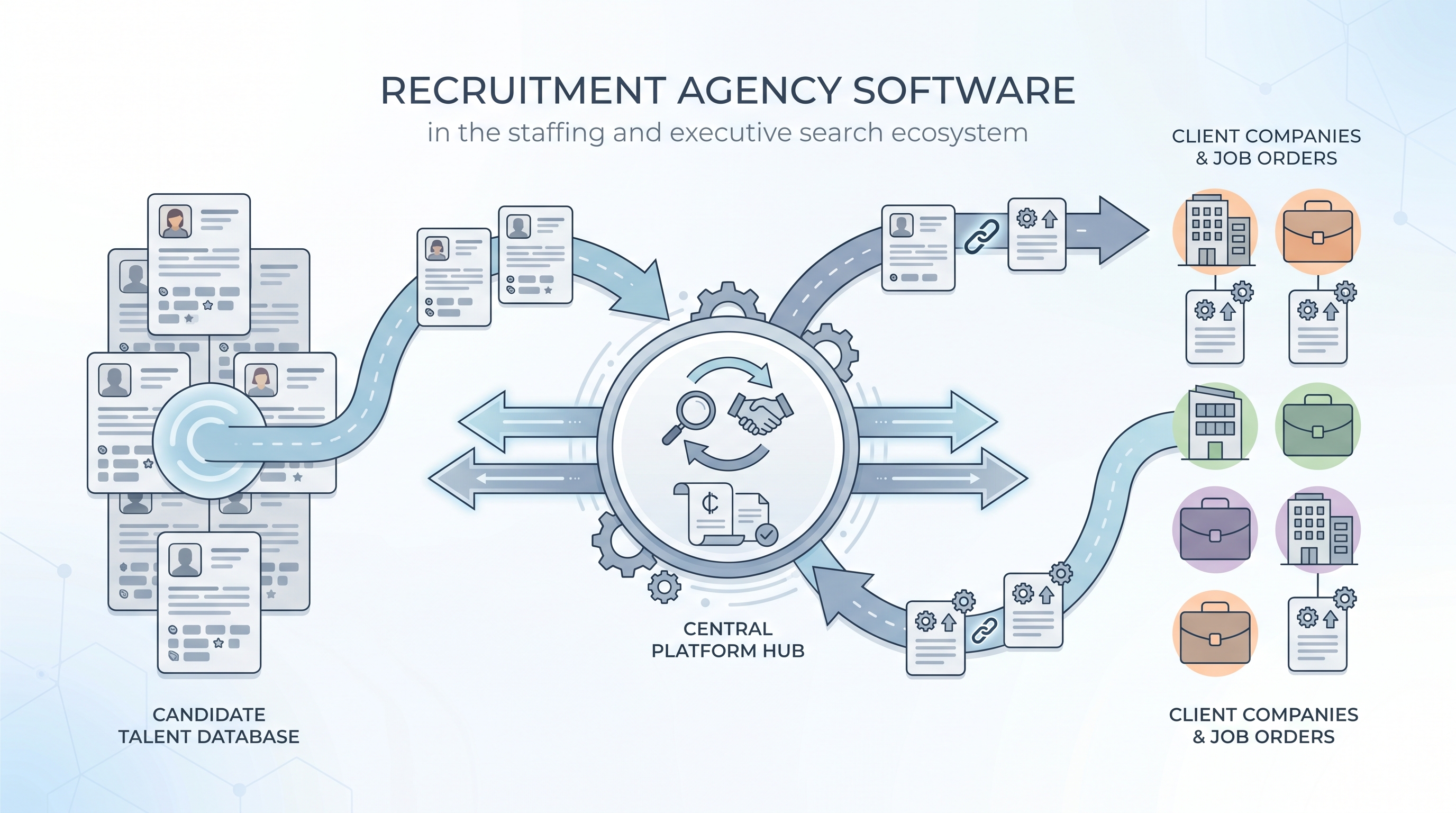
Recruitment agency software is the operational platform a staffing or executive search firm runs to manage its two-sided business: the candidates in its talent database and the client companies that pay placement fees. Unlike an in-house ATS that tracks applicants against a single employer's open roles, agency software ties candidate records to job orders issued by multiple clients, tracks where each candidate has been submitted and to whom, manages client contacts and relationship history, and usually handles fee agreements, commission splits, and invoicing in the same system.
Most platforms combine an ATS-style candidate pipeline with a CRM module for client relationships, because agencies both process active applicants and proactively nurture candidate relationships for future roles. The quality of any AI matching feature depends on how complete and current the candidate database is, because matching engines can only rank profiles that have clean, structured data behind them.
In practice
- An agency consultant describes "working the database" when they search the existing candidate pool for a new job order before going back to LinkedIn, running a match query against stored profiles to surface anyone previously placed or contacted.
- A recruitment manager talks about "split fees" when two consultants share a placement, and the software tracks each consultant's contribution to the introduction and the close for commission calculation.
- A compliance officer asks about "candidate consent status" when a new client wants a CV submittal, because agency software that does not surface opt-out flags can send profiles to clients without checking the person's last recorded preference.
Quick read, then how hiring teams use it
This is for consultants, recruitment managers, and TA ops leads who need to evaluate, configure, or set policy for an agency platform. Skim the first section for a shared definition. Use the second for decisions about AI features, integration, and compliance.
Plain-language summary
- What it means for you: Agency software keeps your candidate database, client relationships, job orders, and fees in one place rather than spread across a CRM, a spreadsheet, and email folders.
- How you would use it: You receive a brief from a client, create a job order, run a match query against your candidate database, submit shortlisted profiles to a client portal, track feedback, and log the placement and fee when the offer is accepted.
- How to get started: Audit your current database for duplicate records and missing consent flags before enabling AI matching. Clean data is the prerequisite for useful match results.
- When it is a good time: Any time you manage more than one client simultaneously, or when commission tracking across consultants is done in a separate spreadsheet outside your main platform.
When you are running live reqs and tools
- What it means for you: Agency software integrates candidate data, job order tracking, and client communication into one audit trail, so you can answer "when did we first contact this person" and "which client saw this CV and when" from a single record.
- When it is a good time: After core data hygiene is in place: consent flags current, duplicate records merged, and key fields filled. AI matching on a noisy database surfaces noise.
- How to use it: Run AI match queries as a starting point, then layer in consultant context the model cannot see: relocation limits, counter-offer risk, and client relationship history. Keep a human-in-the-loop review before any CV is submitted to a client.
- How to get started: Pull a field completion report on your five most-used candidate fields. Fix completion rates before activating AI scoring. See resume parsing for how bad parsing accuracy degrades match quality.
- What to watch for: Opt-out flags not wired to automation triggers, duplicate records from multi-source imports, and AI-generated job adverts posted to boards without a compliance review. Review workflow automation triggers quarterly against your opt-out and retention policy.
Where we talk about this
On AI with Michal live sessions, agency-specific questions come up across the AI in recruiting and sourcing automation tracks: database hygiene, matching calibration, client data boundaries, and building opt-out logic into outreach sequences. If you want the full room conversation with peers who run agency stacks, start at Workshops and bring a specific job order or workflow that is not working as expected.
Around the web (opinions and rabbit holes)
Third-party creators cover this space actively. These are starting points, not endorsements. Verify tool capabilities and compliance postures directly with vendors before connecting candidate data.
YouTube
- Bullhorn for Staffing Agencies is the vendor's channel with feature walkthroughs and configuration tutorials useful for building evaluation vocabulary before you shortlist platforms.
- Switching ATS in a Recruitment Agency: Lessons Learned surfaces practitioner accounts of migrations, more useful than feature comparison charts for understanding real tradeoffs.
- Recruitment Agency Database Setup and Hygiene covers the data quality decisions behind a working candidate database that AI matching depends on.
- Switching ATS -- what did you wish you knew? in r/RecruitmentAgencies covers migration pain points and data mapping decisions from agencies that have been through it.
- I want to make some recruitment automated workflows in r/RecruitmentAgencies is a frank discussion about where to start with automation inside an agency platform.
- What ATS does your company use? in r/recruiting collects candid recruiter experiences with major platforms, many from agency context.
Quora
- What is the best software for a recruitment agency? collects practitioner opinions across agency sizes, billing models, and recruitment niches.
Agency software versus in-house ATS
| Feature | Recruitment agency software | In-house ATS |
|---|---|---|
| Candidate records | Owned by the agency across all clients | Tied to one employer's requisitions |
| Client management | Multi-client CRM with job order tracking | Single employer, internal stakeholders |
| Revenue tracking | Commission splits, fee agreements, invoicing | Not applicable |
| GDPR controller | Agency is data controller | Employer is data controller |
| AI matching scope | Candidates across all clients and job orders | Candidates against internal open reqs |
Related on this site
- Glossary: Applicant tracking software, Resume parsing, Candidate data enrichment, Workflow automation, Human-in-the-loop, Best recruitment platform, AI recruitment software, Semantic search
- Blog: AI sourcing tools for recruiters
- Guides: Sourcers
- Workshops: AI in recruiting
- Course: Starting with AI: the foundations in recruiting
- Membership: Become a member