Best recruiting software
The recruiting software most useful to your team is the combination that handles your req volume, connects cleanly to your ATS, and lets recruiters run sourcing, screening, and outreach without switching tools for every step.
Michal Juhas · Last reviewed May 5, 2026
What is the best recruiting software?
There is no universal answer. The best recruiting software for your team is the combination your recruiters actually run on live reqs, that keeps candidate data clean from sourcing through offer, and that your compliance team can audit when questions arrive.
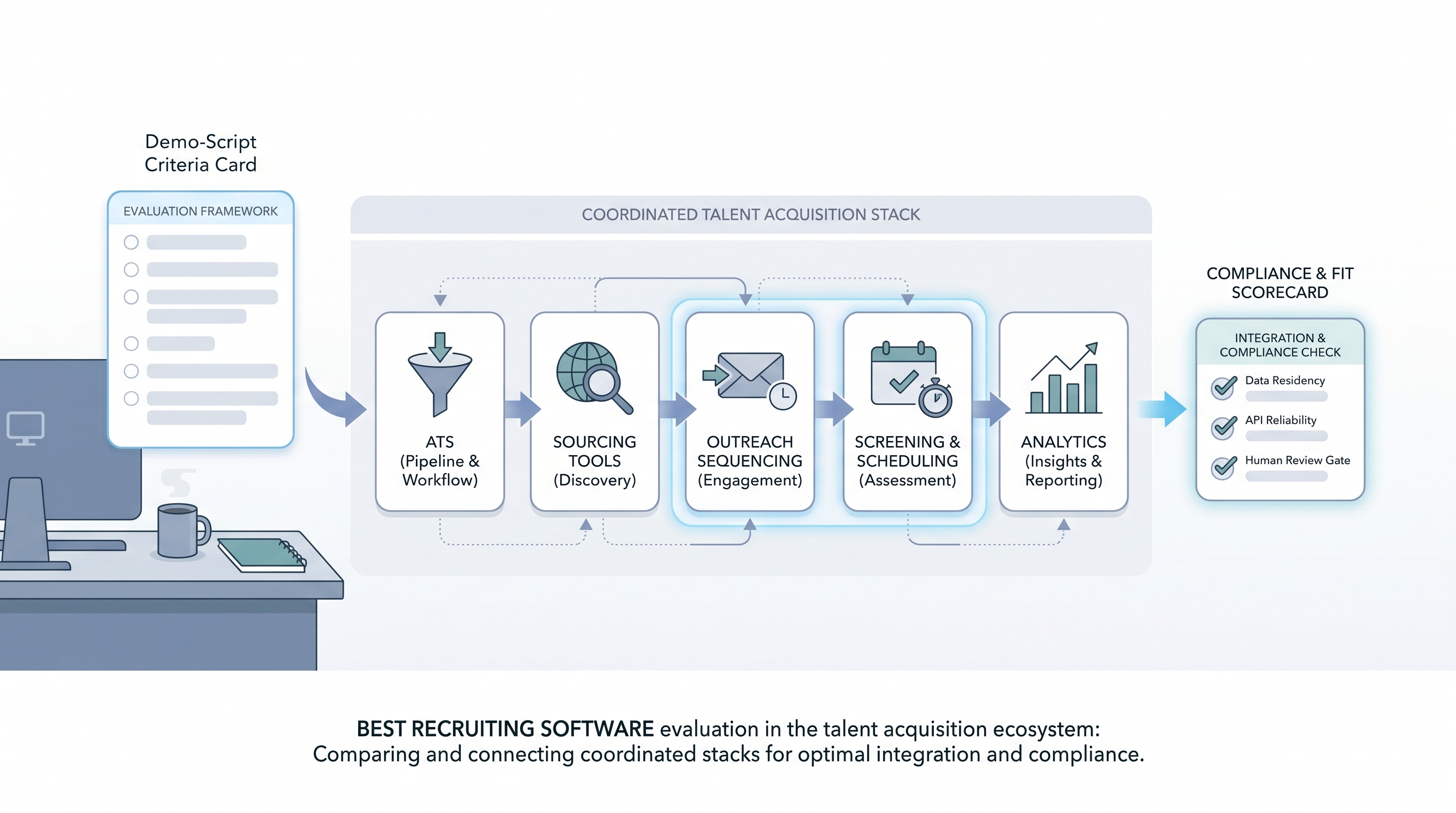
Most teams searching for "best recruiting software" are either building a stack for the first time or replacing tools that stopped fitting the way the team works. This page focuses on evaluation criteria, not vendor rankings, because fit depends on workflow, req volume, and integration depth far more than feature lists or analyst quadrants.
In practice
- A sourcer describes the best recruiting software as the one where she writes a Boolean search, sends three personalized messages, and moves candidates to the next stage without opening a spreadsheet at any point.
- A TA ops lead calls the stack broken when sourcing tools and the ATS no longer share a clean record, forcing a CSV export before every debrief.
- A head of TA raises a compliance flag when she discovers an AI shortlisting module was enabled by one recruiter without a legal review of the subprocessor list or a signed DPA amendment.
Quick read, then how hiring teams use it
This is for recruiters, TA leads, TA ops, and HR partners evaluating a first stack or replacing tools that no longer fit. Skim the first section for vocabulary. Use the second when making the actual selection.
Plain-language summary
- What it means for you: Best recruiting software is relative to your req volume, your team size, and your capacity to configure and maintain tools. No vendor earns the label across all contexts.
- How you would use it: Write a demo script from your five most painful workflow moments before you contact any vendor. Run every finalist through the same script on a sample of your own historical data before a second call.
- How to get started: List the moments last month where your current stack cost you time. Map each failure to the handoff it broke: sourcing to ATS, ATS to scheduling, feedback to offer. The tool that fixes the most common failures is the right starting point.
- When it is a good time: At contract renewal, after an integration audit surfaces data quality errors, or when AI features require a cleaner data foundation than your current stack produces.
When you are running live reqs and tools
- What it means for you: Tool selection sets the data model that every downstream workflow inherits: recruiting email automation, AI shortlisting, diversity reporting, and outreach sequencing all depend on the quality of the foundation the recruiting software builds.
- When it is a good time: Before signing a multiyear deal, after a failed integration audit, or when hiring managers lose confidence in the pipeline metrics your tools produce.
- How to use it: Run parallel exports from your current system and replay the same queries on a trial tenant using your historical candidate data. Involve legal, IT, and finance before the final demo, not after. Maintain one shared evaluation scorecard all stakeholders update during the process.
- How to get started: Freeze new shadow integrations for thirty days while you document every tool that currently moves candidate data. Map each connection to a supported API and flag every CSV bridge as a migration risk before comparing alternatives.
- What to watch for: AI modules marketed as features but unavailable for real testing during trials, opaque per-user pricing that surfaces after go-live, and sales engineers who cannot show error budgets, rollback paths, or data deletion workflows.
Where we talk about this
AI in recruiting workshops cover tool evaluation as part of the broader stack conversation: how to script a realistic vendor demo, what to bring to legal review, and which AI features are production-ready versus in early access. Sourcing automation sessions go deeper on integration reliability and API contract stability. Bring your vendor shortlist to Workshops so peers who have already migrated can challenge your assumptions before you sign.
Around the web (opinions and rabbit holes)
Third-party creators move fast in this space. Treat these as starting points, not endorsements. Verify vendor capabilities and compliance postures directly before connecting candidate data.
YouTube
- Best recruiting software for 2025 for buyer-perspective walkthroughs that show admin settings and configuration depth beyond the sales deck.
- Recruiting software comparison for small teams for practitioner-led reviews across company sizes including solo recruiters that rarely appear in enterprise analyst reports.
- Switching recruiting software: lessons learned for migration stories covering data mapping decisions and what teams wished they had documented before starting.
- What recruiting software does your company use? in r/recruiting collects candid recruiter experiences across company sizes and req volumes.
- Best tools for a solo recruiter in r/recruiting for lightweight stack discussions from teams where one person runs full-cycle.
- ATS data quality -- anyone else have this problem? surfaces field completion and stage hygiene issues that vendor demos skip.
Quora
- What is the best recruiting software for small businesses? collects practitioner opinions across budget ranges; cross-reference with Reddit threads above for balance.
Recruiting software evaluation criteria at a glance
| Category | What to test in the demo |
|---|---|
| Core pipeline | Stage logic, req lifecycle, duplicate candidate handling |
| Sourcing integration | Boolean import, enrichment sync, deduplication quality |
| AI readiness | Parsing accuracy, scoring explainability, bias audit support |
| Compliance | Data residency, retention controls, subprocessor list |
| Support and migration | Rollback paths, data export, SLA for critical incidents |
Related on this site
- Glossary: Applicant tracking software, Hiring platforms, Hiring tools, Best recruitment platform, Best applicant tracking software, Best hiring software, Talent sourcing software, Resume parsing, Workflow automation, Human-in-the-loop, AI bias audit
- Blog: AI sourcing tools for recruiters
- Guides: Sourcers
- Workshops: AI in recruiting
- Course: Starting with AI: the foundations in recruiting
- Membership: Become a member